
Notifications

Most of a practice's waiting is waiting to find out: that a colleague has passed you the next piece of a job, or that the client has finally sent the records. Notifications tell the right person as it happens, in the app first and by email only if they haven't seen it.

At a glance

  • A bell in the top bar with an unread count, and a full inbox with Unread and Done views
  • Arrives as it happens, with a pop-up on whatever screen you are on
  • Tasks and workflow steps assigned to you, and steps that are ready for you to start
  • Client responses: documents sent, forms completed, confirmations, approvals and rejections
  • Client activity: portal uploads, accepted proposals and engagement letters, HMRC authorisation codes
  • Emails only what you haven't already seen in the app
  • Every type switched on or off separately for the app and for email
  • Clears itself when the work moves to someone else

Work Handed to You

When a colleague assigns you a task or a workflow step, you hear about it straight away, with the client and the due date alongside. Hand someone twenty tasks at once and they get one notification listing them, not twenty.

The most useful one is often a step is ready for me. When the steps before yours are finished, you are told, along with who finished the last one. The reviewer no longer has to keep checking whether the preparer is done, and the job doesn't sit between people overnight.

Assigning work to yourself doesn't notify you, and nor do the tasks Sodium creates for you on a schedule. If the work is moved to someone else before you have looked at it, the notification clears itself.
Clients Responding

Half the work in a practice is waiting on clients. Sodium tells the person responsible the moment a client:

"The person responsible" is worked out for you: for a response to a task, whoever has the workflow step, else whoever has the task, else the client manager; for anything else, the client manager. Where a step sent the client a form or a request, the notification links straight to it.

The Bell and the Inbox

Notifications arrive in the app as they happen, without a refresh. A pop-up appears on whatever screen you are on, and the bell in the top bar keeps count. Open the bell for the latest few, or go to the inbox for everything: mark items read or unread, and mark them done to clear them away without losing them.

You only see notifications about clients you are allowed to see, and a notification that was right when it arrived still makes sense later, after a task or client has been renamed.

Email When You Haven't Seen It

An email for every assignment is how inboxes fill with things nobody reads. So for tasks and workflow steps, Sodium waits. If you haven't seen the notification in the app within 30 minutes, and the work is still yours and still open, it's emailed to you. If you have seen it, or the work has moved on, no email is sent. Several waiting at once arrive as one email.

Client responses are emailed straight away, as they were before notifications arrived, so nobody misses a reply they were already getting by email. Every email carries a link to stop that kind of email in one click.

A Switch for Everything

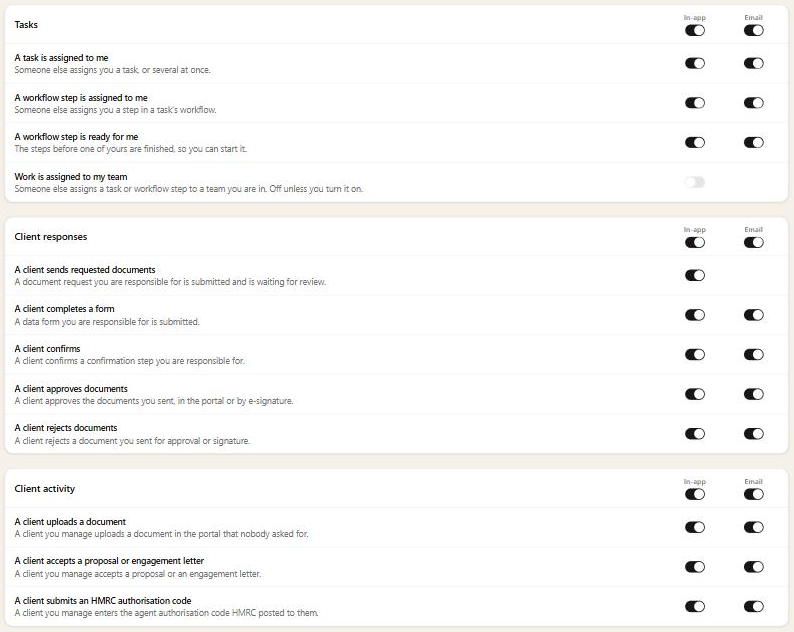
Each person chooses what they hear about. Every type has its own switch for the app and for email, and each group has a switch to turn the lot off at once. Everything is on to begin with, except notifications about work assigned to a team you're in, which are off unless you turn them on, since most team members don't need to hear about every job their team is given.

Notification settings grouped into Tasks, Client responses and Client activity, each type with its own In-app and Email switch, and Work is assigned to my team switched off