
Keyboard Shortcuts

Get through your day without reaching for the mouse. Two keys take you to any part of Sodium, one search finds any command, and the keys are yours to change.

At a glance

  • G and a letter takes you to Clients, Tasks, Time, Reports and the rest
  • Ctrl+K (Cmd+K on a Mac) finds any command by name
  • J and K step through your clients, contacts, tasks, time and proposals
  • N adds a new one, / jumps to the search box
  • Shift+T starts or stops your timer, and . opens the Focus Panel
  • Reply, reply all and forward an email without leaving the keyboard
  • Press ? to see every key, and change any you like
  • Off until each person turns it on, and never in the way while you type

Anywhere in Two Keys

Press G, then the first letter of where you want to be. G then C is Clients, G then T is Tasks, G then H is the time you have logged. It works from every page, so moving between a client, their tasks and the time spent on them takes a moment, not a hunt through the menu.

The keys follow your menu. Each person only gets the places they can use, so nobody presses a key for a page their role keeps them out of.

Go to DashboardGthenD
Go to ClientsGthenC
Go to ContactsGthenP
Go to TasksGthenT
Go to TimeGthenH
Go to ReportsGthenA
Go to SettingsGthenS
Every Command, One Search Away

Can't remember a key? Press Ctrl+K (Cmd+K on a Mac) and start typing. The command palette lists everything you can do on the page you are on, with its key beside it, so the shortcuts you use most stick without a cheat sheet taped to the monitor.

It opens from anywhere, even from inside a search box, and it only shows what works where you are.

Go to
Go to TasksGthenT
Go to TimeGthenH
General
Start or stop the timerShiftT

Your Keys, Your Way

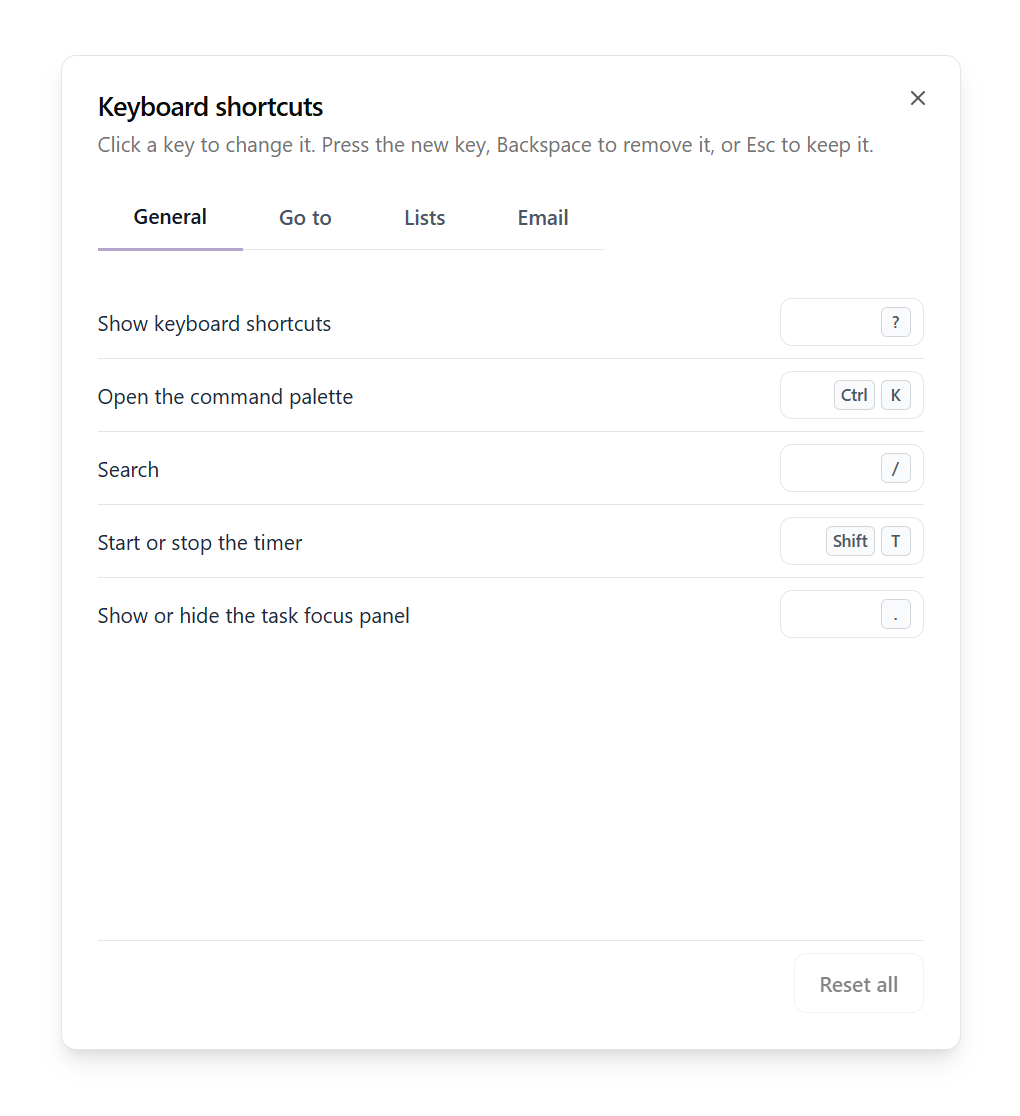
Press ? on any page to see every shortcut, grouped by where it works. Don't like a key? Change it to one that suits your hands, or switch it off. Sodium won't let two commands share a key, so a new choice never quietly breaks an old one.

Your keys are kept with your account, so they follow you to any computer you sign in on.

The keyboard shortcuts sheet, with tabs for General, Go to, Lists and Email, listing each command beside its key

Lists Without the Mouse

On Clients, Contacts, Tasks, Time and Proposals, J and K move down and up the list and Enter opens the one you are on. N adds a new one and / takes you to the search. Working through a morning's list becomes a rhythm rather than a series of clicks.

Email at the Speed of Reading

In the mailbox, J and K open the next and previous conversation, D replies, E replies to all and F forwards. Compose, refresh and search each have a key of their own, so you can read and answer the morning's mail without leaving the keyboard.

Out of Your Way

Shortcuts are off until each person turns them on, so nobody is surprised by a key that does something. Once they are on, they never fire while you are typing a note, an email or a search, and a search box that is waiting for you still lets G and a letter take you somewhere else.