
Agent Authorisations

Before you can act on behalf of a client with HMRC, the right agent authorisations need to be in place. Sodium lets you request 64-8 authorisations from HMRC without leaving the app, sends the client a link to enter the code HMRC posts them, and tracks which have been requested, which have been granted, and which are still missing - from the client record or, across every client at once, from a single page in Settings.

Request 64-8 Authorisations From Sodium

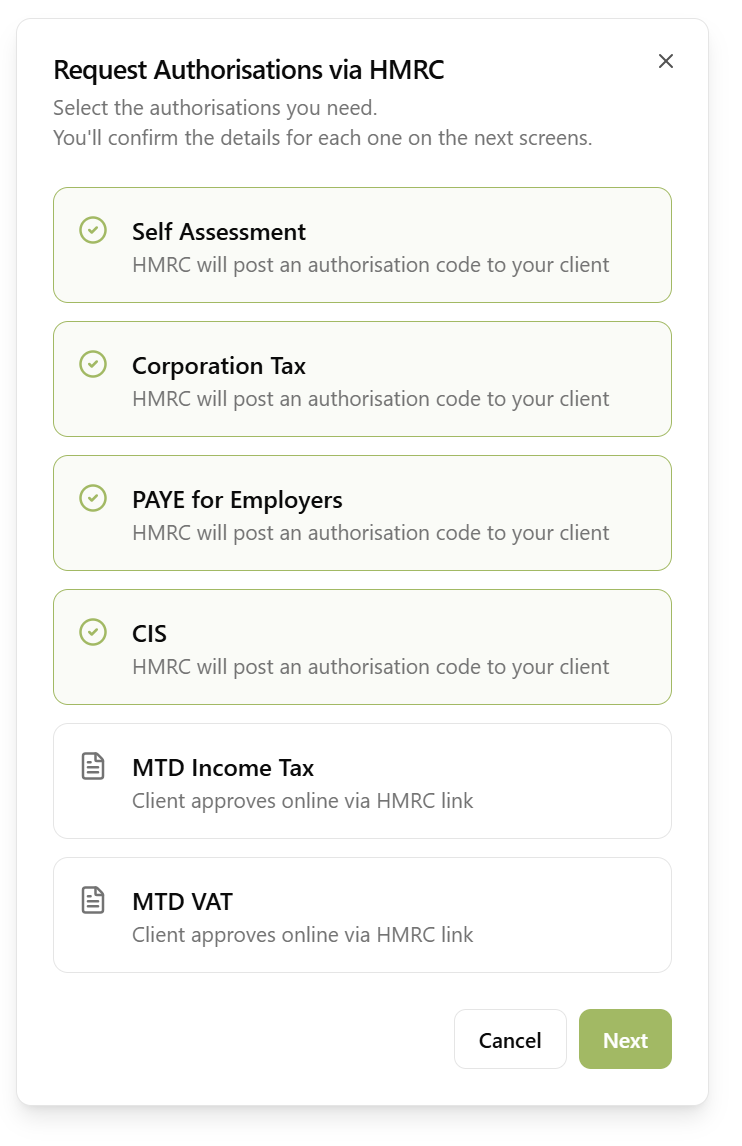
Request Authorisations via HMRC dialog showing Self Assessment, Corporation Tax, PAYE for Employers and CIS selected

Connect your practice to HMRC once in Settings, and you can raise agent authorisation requests straight from the client record. Pick the authorisations you need and Sodium submits them to HMRC for you:

  • Self Assessment
  • Corporation Tax
  • PAYE for Employers
  • Construction Industry Scheme

Sodium pre-fills the values HMRC match the client on - UTR, National Insurance number, and so on - from the client record, so most requests are a case of checking rather than typing. Anything missing can be filled in directly from this screen.

Making Tax Digital authorisations - MTD for Income Tax and MTD for VAT - work differently: rather than a posted code, the client approves an authorisation link online. Support for requesting those through Sodium is coming soon.

Let the Client Enter the Code Themselves

HMRC post an authorisation code to your client. In the past you'd have to chase them for it, and when they finally handed it over you'd need to find their client record, then the relevant authorisation, then enter the code and hope it works.

Sodium is different. We send the client a link telling them to look out for the code, and to enter it there when it arrives. We chase them automatically until they do, validate the code with HMRC, update the authorisation, and email you to say it is done.

HMRC allow three attempts at a code. Sodium stops the client after two and emails you, so the last attempt always stays with your practice - you can check the letter with the client before trying your final attempt.

Or do it the old way - all of this is optional. You can still enter the code yourself against the pending request.

Chased Automatically, Like Everything Else

A code sitting on a client's kitchen table is another thing to remember, so Sodium remembers it for you. Switch chasing on in Settings, set how often the reminder goes out, and edit the pre-written email yourself so the tone matches how you would normally follow up. Every reminder carries an Enter Code button that takes the client straight back to their page.

A client waiting on several services gets one reminder listing them all, rather than the same button three times. Chasing stops the moment the code goes in, so nobody is nagged for something they have already done - and where the same client is behind on a document request or a form as well, it all arrives in one email instead of three.

Track Authorisation Status

Each client record shows the status of all relevant HMRC agent authorisations. Sodium covers the full range of 64-8 authorisation types:

  • Self Assessment
  • Corporation Tax
  • PAYE for Employers
  • Individual PAYE
  • VAT
  • Construction Industry Scheme
  • Tax Credits
  • High Income Child Benefit Charge
  • Making Tax Digital for Income Tax
  • Making Tax Digital for VAT
  • Trusts

For each type, record whether the authorisation has not been requested, has been requested, or has been granted. Where the request went through Sodium the status updates itself; authorisations you already hold, or that were arranged elsewhere, can be recorded by hand. Either way your team can see the full picture at a glance without digging through emails or spreadsheets.

Every Client's Authorisations on One Page

The HMRC Agent page in Settings lists every client whose services need an agent authorisation, one row per client and one column per authorisation type. A key at the top counts how many sit in each state across the practice - click a figure to filter the list to just those clients - and you can also filter by status and search by name.

The 64-8 Authorisations tab shows the status your practice holds for Self Assessment, Corporation Tax, PAYE and CIS. Anything still not requested can be raised right from the row: a Request button opens the same request flow as the client record, already on the details step, and where a client needs several authorisations Request all takes you through them in one go.

The MTD Authorisations tab goes further for MTD for Income Tax and MTD for VAT: it confirms with HMRC which clients you are actually authorised to act for - useful when you hold authorisations that were never requested through Sodium, and for spotting any a client has since removed. Clients that cannot yet be checked because a National Insurance number, postcode, VAT number or VAT registration date is missing are flagged, and an Enter details button lets you fill the gap and re-check with HMRC without leaving the page. Where HMRC has no record of an authorisation, or a check fails, you can correct the details and try again the same way.

Link Authorisations to Services

When configuring your services, you can specify which agent authorisations each service requires. For example:

  • A VAT Returns service might require MTD for VAT authorisation
  • A Self Assessment service requires Self Assessment authorisation
  • A Corporation Tax service requires Corporation Tax authorisation
  • A Payroll service requires PAYE for Employers authorisation

Sodium automatically works out which authorisations a client needs based on the services they're taking. When you open a client record, any required authorisations that haven't been granted are highlighted so you can see immediately what needs attention - and request them there and then. No more discovering at filing time that the 64-8 was never submitted.

Part of Your Onboarding Flow

Agent authorisations fit naturally into the client onboarding process. When a new client accepts a proposal, Sodium knows which services they've signed up for and which authorisations those services require. Your team can then work through the list, submit the requests to HMRC, and have everything in place before work begins.

Want to learn about other capabilities?

Explore all features

Have questions or suggestions?

Get in touch