Client Management

At the heart of Sodium is a powerful client management system designed to be the system of record for your entire client base. From prospect to active client and beyond, Sodium gives you a complete view of every client relationship - their contacts, services, documents, notes, and history - all in one place.

Client Records

The client record is at the heart of everything in Sodium. It's the single place your team goes to understand a client relationship -and from it, everything else connects.

From each client record you can view invoices pulled from your accounting software, check their AML status, manage documents, pin notes, see associated clients, and much more. Track client status as relationships develop - from Prospective through to Active, Completed, or Lost - and store VAT numbers, company registration numbers, UTR references, and your own internal codes.

Assign responsibility at three levels (Partner, Manager, and Associate) so it's always clear who owns the relationship, who's doing the work, and who's overseeing it.

Sounds like too much? Don't worry - the highly configurable settings section lets you turn off features you don't use, so Sodium stays as simple or as powerful as your practice needs.
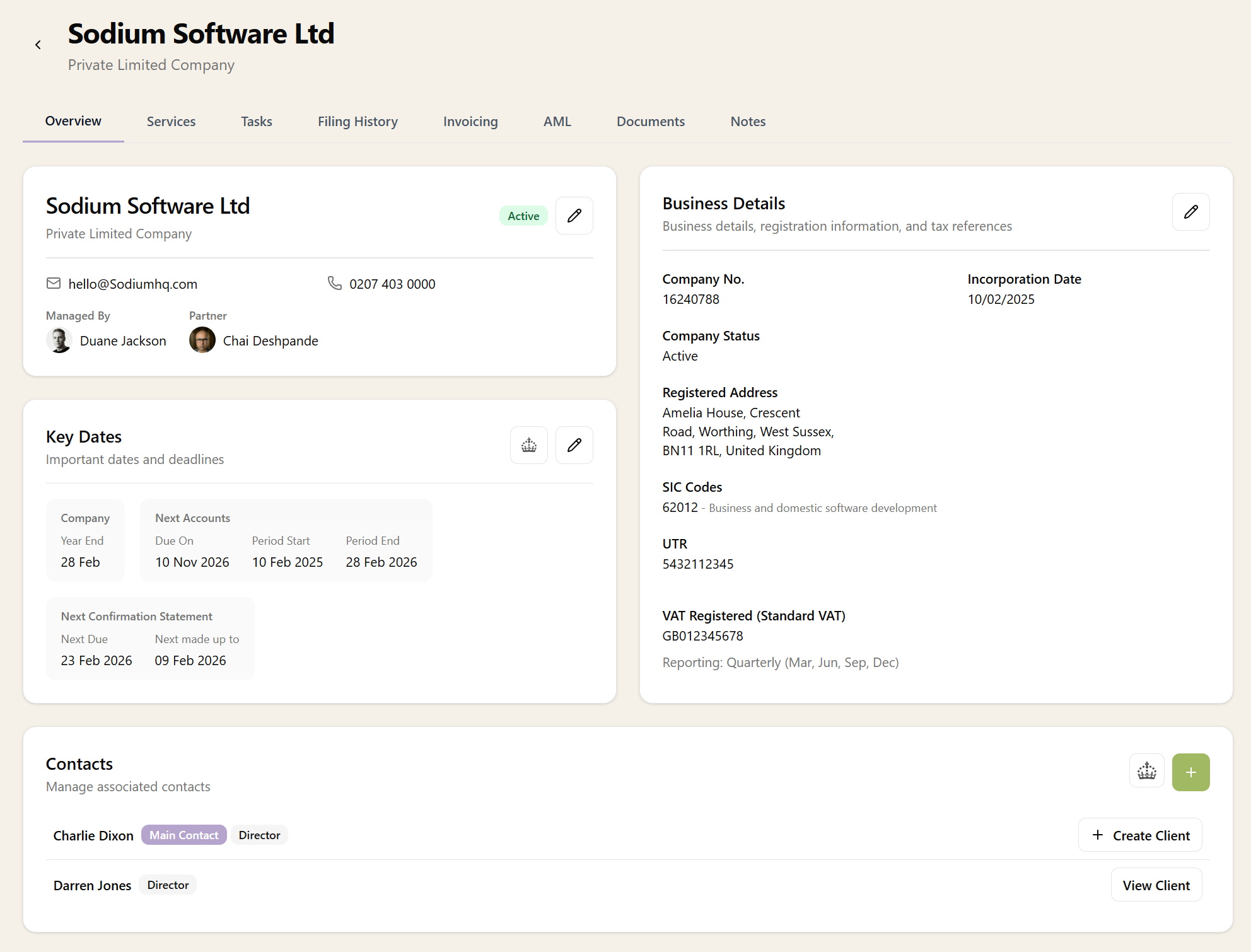
Client record showing overview, business details, key dates, and contacts for a limited company

Contacts

Each client can have multiple contacts - primary, secondary, accounts, tax, or any other role you need. Store full contact details including email, phone, mobile, and postal address.

Contacts can be associated across multiple clients, so if one person is the director of several companies, you only need their details once. If a contact is also a client in their own right, you can click straight through to their individual client record. Search and sort contacts across your entire practice, and manage email preferences per contact so communications always go to the right person.

Powerful Filtering and Search

Finding the right client is fast and intuitive. Filter your client list by status, manager, partner, associate, or the services they subscribe to. Full-text search works across client names and details, so you can find what you need in seconds.

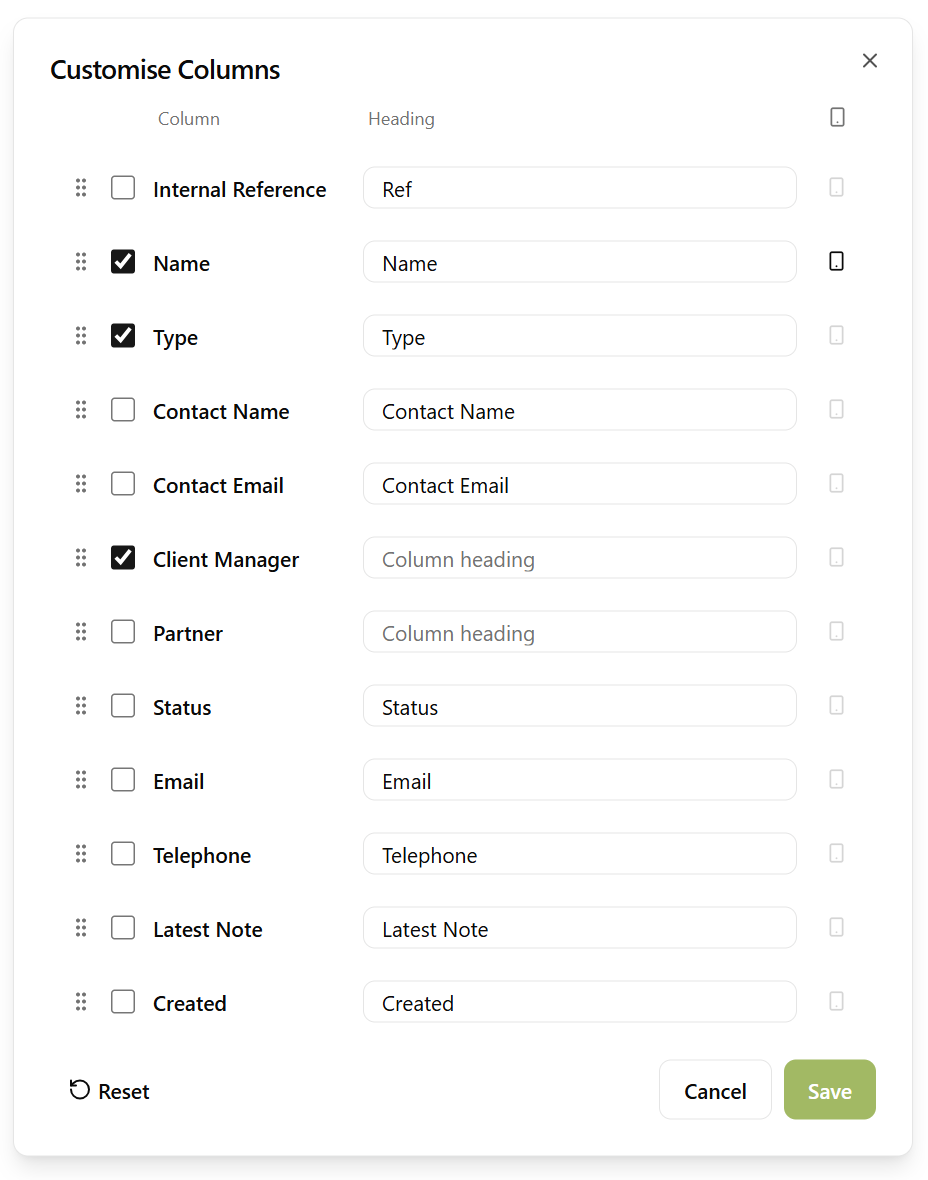
Recently viewed clients are always available for quick access, and sortable columns let you organise clients however makes sense for your workflow.

Bulk Actions

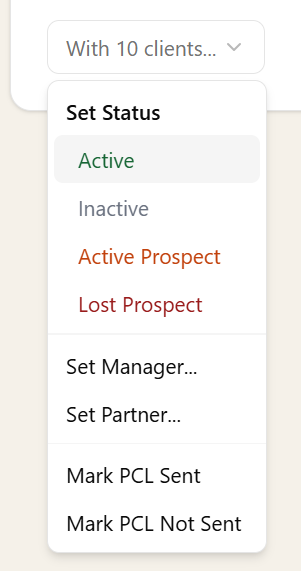
Need to update several clients at once? Select multiple clients from the list and apply changes in bulk - set status, assign a manager or partner, or mark PCL status across all of them in a single action.

It's a simple way to keep your client list tidy without clicking through records one by one.

Bulk actions dropdown showing options to set status, manager, partner, and PCL status for 10 selected clients

Import and Export

Getting your clients into Sodium is straightforward. Bulk import from CSV files with intelligent field mapping that guides you through matching your columns to Sodium's fields. Export your client list to CSV at any time for reporting or backup.

You can also sync clients directly from your accounting software - Xero, QuickBooks, FreeAgent, or Sage - so your client list stays aligned across platforms without manual re-entry.

When importing limited companies, Sodium automatically enriches records with Companies House data, so you get complete, accurate records from day one.

Documents and Notes

Attach and manage documents against each client record. Optionally store files in your own cloud storage - Google Drive or OneDrive - with an organised folder structure that keeps everything tidy.

Pin important notes to client records so critical information is always visible.

Custom Fields

Every practice is different, and Sodium lets you capture the information that matters to yours. Add as many custom fields as you need to client records, with a range of data types to suit any use case:

  • Text
  • Number
  • Date
  • Yes / No
  • Dropdown
  • Multi-select

Custom fields appear alongside standard client details, so your team always has the full picture without switching between systems or maintaining separate spreadsheets.

Custom fields aren't just for display. Date-type custom fields can drive recurring task schedules, and all custom field values are available as dynamic variables in your proposals, engagement letters, and emails — so the data you capture is put to work across the platform.

Agent Authorisations

Track the status of HMRC agent authorisations directly on each client record. See at a glance which 64-8 authorisations have been requested, granted, or are still missing - based on the services the client is taking.

Learn more about Agent Authorisations →

Connected to Everything

Clients aren't isolated records - they're at the centre of everything in Sodium. From a client record, you can:

Everything flows from the client record, so your team always has the full picture in one place.

Want to learn about other capabilities?

Explore all features

Have questions or suggestions?

Get in touch