
Focus Panel

A slide-out panel for working through your tasks without losing your place. Customisable, persistent, and powered by saved views.

Work Without Losing Context

The Focus Panel is accessible from every page of the application. Open it when you need it, or pin it open so it stays with you as you move around - keeping your current work front and centre. It shows your tasks in separate tabbed views, so you can step through what you're working on or pick up something that needs attention.

Each task shows its status, due date, assignee, and where it sits within its workflow. Complete workflow steps, add notes, and update progress - all without navigating away from what you were doing. When you finish a step, the panel moves you straight to the next one, keeping your momentum going.

Out of the box it comes with sensible defaults, but every aspect is customisable - configure which views appear, what colour they use, and which saved task views power them.
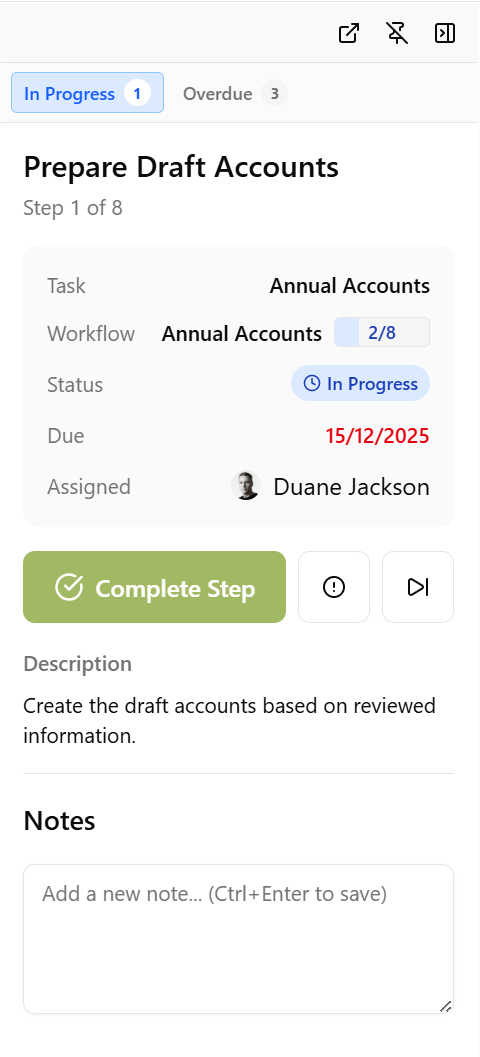
Focus Panel showing an in-progress workflow step with task details, a Complete Step button, description, and notes

Sensible Defaults

The Focus Panel ships with three default views out of the box:

  • In Progress - tasks you're currently working on
  • Overdue - tasks that have passed their due date and need attention
  • Upcoming - tasks coming up soon so you can plan ahead

These defaults mean the panel is useful from day one with no setup required. But if you want more, everything is customisable.

Fully Customisable Views

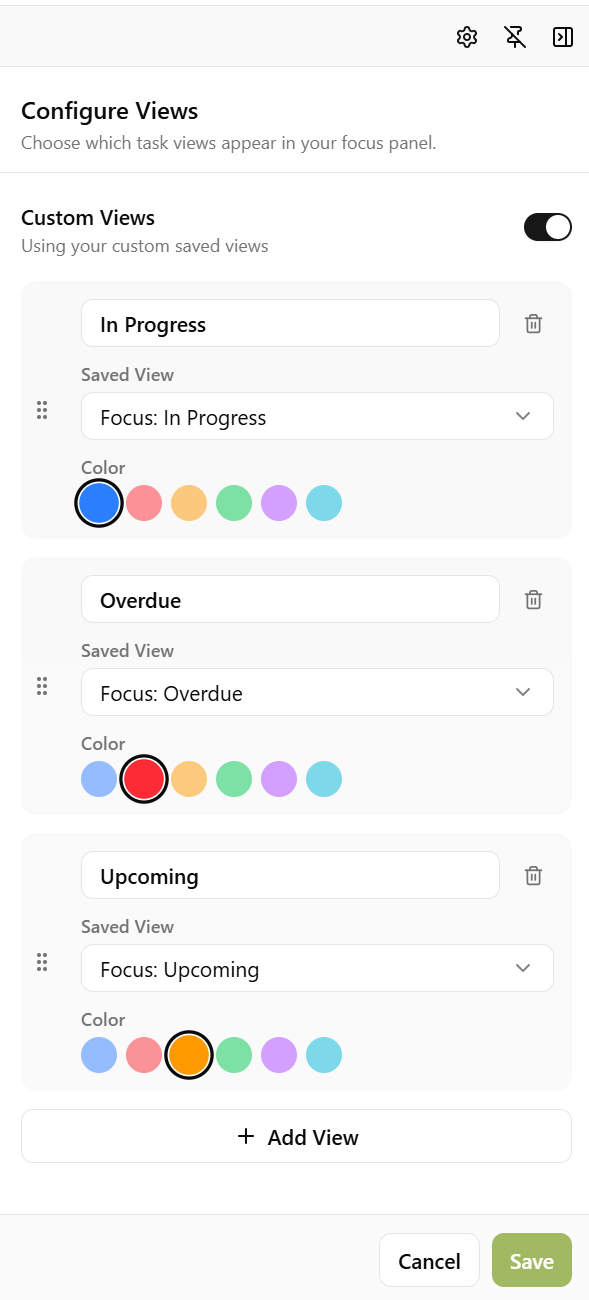
Open the configuration screen and you can add, remove, or reorder the views that appear in your Focus Panel. Each view is backed by a saved task view - a pre-configured query of your tasks - so you have complete control over what appears.

For each view you can set:

  • Name - the label shown on the tab
  • Saved View - which saved task view powers it
  • Colour - a colour accent for the tab, so you can tell views apart at a glance

Want an "Upcoming" tab showing tasks due this week? A "My VAT Returns" tab for a specific service? A "Blocked" tab for tasks that need unblocking? Just create a saved view with the right filters and add it to your panel.

Focus Panel configuration screen showing custom views for In Progress, Overdue, and Upcoming with colour and saved view options

Powered by Saved Task Views

The Focus Panel builds on Sodium's saved task views. A saved view is a reusable query that filters your tasks by any combination of status, assignee, due date, client, service, category, and more.

Saved views are useful throughout Sodium - you can add them to the main navigation menu for quick one-click access, use them in dashboard widgets, and now use them to power the Focus Panel. The same view can be used in multiple places, so there's no duplication.

Create a saved view once and use it wherever you need it.

Drag to Reorder

The order of views in your Focus Panel is up to you. Drag and drop tabs to rearrange them so the views you use most are always at the top. The first view in the list is the one that's shown when you open the panel.

Want to learn about other capabilities?

Explore all features

Have questions or suggestions?

Get in touch