

Workflows

Some tasks are simple - one person, one action, done. But most accountancy work involves multiple steps, often handled by different people. Workflows help you break complex tasks into manageable pieces.

Create workflow templates once, then apply them to tasks automatically. Everyone knows what needs doing, in what order, and who's responsible.

Workflow Templates

A workflow template defines a sequence of steps that apply to a type of work. For example, an "Annual Accounts" workflow might include:

  • Request information from client
  • Receive and review information
  • Prepare draft accounts
  • Manager review
  • Partner review
  • Client approval
  • File with Companies House
  • File with HMRC

Create templates for each type of recurring work in your practice. When a task is created, attach the appropriate workflow and all the steps are ready to track.
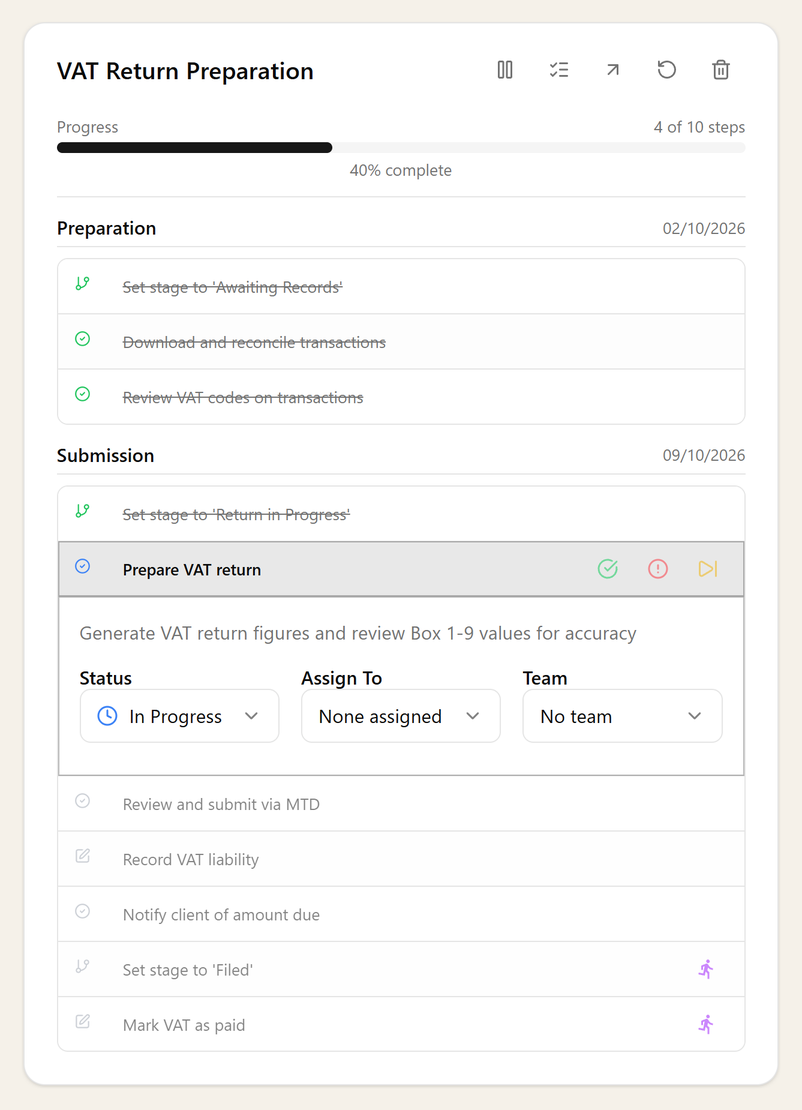
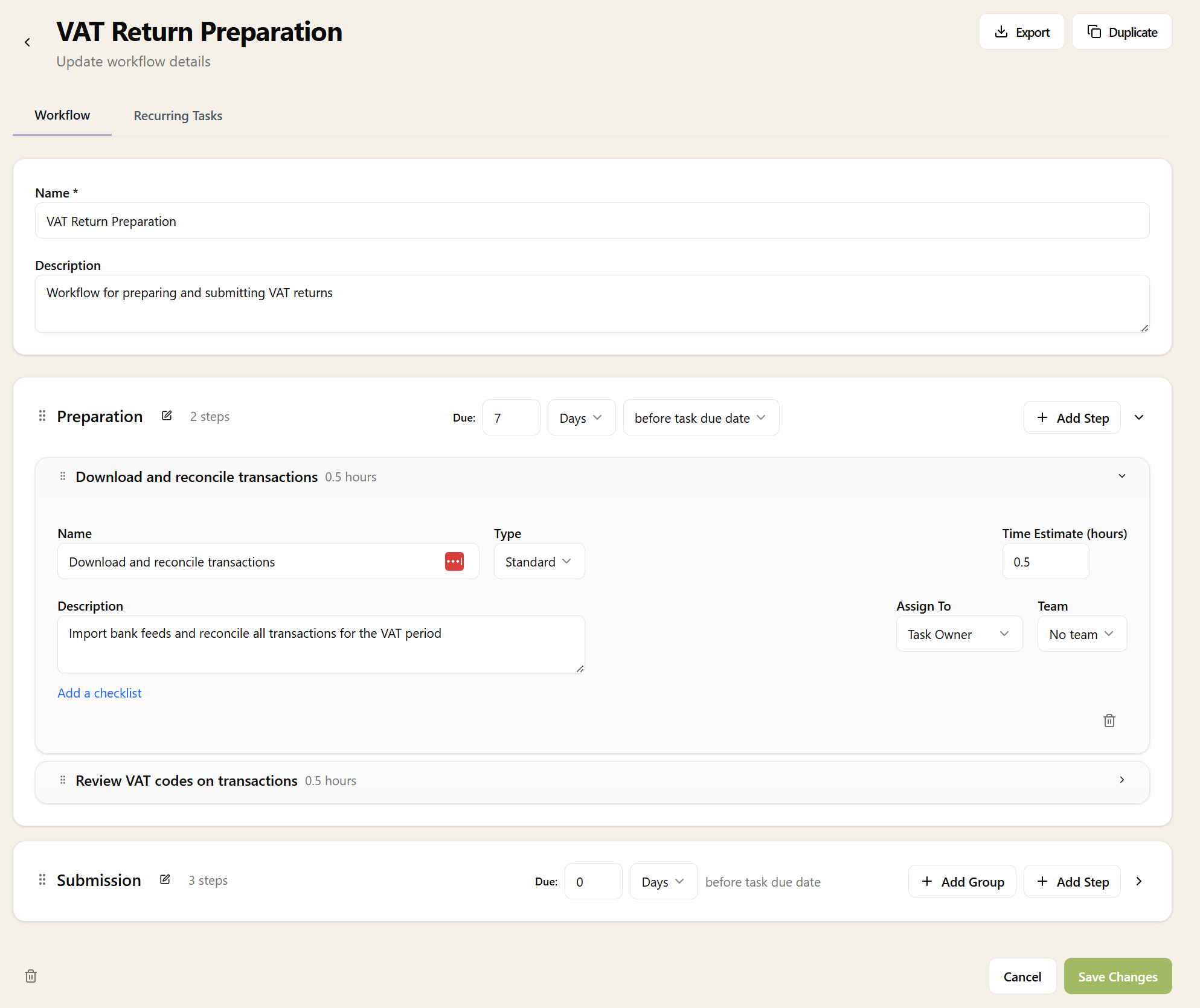
Workflow panel showing Annual Accounts workflow with progress tracking, step groups including Information Gathering, Draft Preparation, Internal Review, and Client Approval and Filing

Step Groups

Organise workflow steps into logical groups. Groups help structure complex workflows and make progress easier to visualise:

  • Information Gathering - Request data, chase client, receive documents
  • Preparation - Draft accounts, prepare tax computations
  • Review - Manager review, partner sign-off
  • Completion - Client approval, filing, archiving

Each group can expand and collapse, keeping the workflow view clean even for complex multi-step processes.

AI-Generated Workflows

Don't know where to start? AI can help. When you create a new workflow, just provide a name and description - Sodium will suggest a sensible set of steps based on the type of work.

For "Client Onboarding," it might suggest steps like: AML checks, engagement letter, service setup, accounting software connection, and initial meeting. Accept the suggestions as-is, tweak them, or start from scratch - you're in control.

AI suggestions are a starting point, not a straightjacket. Customise workflows to match exactly how your practice operates.

Step Assignment

Different steps often require different people. A junior might handle data entry while a manager does the review. Workflow steps can be assigned:

  • To a specific person
  • To the task owner (whoever the task is assigned to)
  • To the client manager
  • To the client partner
  • Left unassigned for anyone to pick up

When the workflow is attached to a task, these assignments resolve to actual people based on the client and task context.

Progress Tracking

As steps are completed, progress is tracked automatically. See at a glance:

  • Which steps are done
  • Which step is currently in progress
  • Which steps are blocked or waiting
  • Overall percentage complete

Each step records who completed it and when, creating an audit trail of the work done.

Dependencies

Some steps can't start until others are finished. Workflows support dependencies so that:

  • Steps within a group are completed in order
  • Groups can be set to complete before the next group begins
  • Certain steps can be flagged as blocking until complete

Dependencies ensure work happens in the right sequence without needing constant supervision.

Service Integration

Workflows are linked to services through recurring tasks. When you set up a service, you specify:

  • Which recurring tasks should be created for that service
  • Which workflows should attach to those tasks

When a client accepts a proposal for that service, the tasks are created and workflows attached automatically. No manual setup required.

Reusable and Flexible

The same workflow template can be used across many tasks. "Annual Accounts" applies to every accounts preparation job. "VAT Return" applies to every quarterly VAT task.

When attached to a task, the workflow becomes an instance that can be customised for that specific job if needed - add steps, skip steps, or reassign work without affecting the template.

Want to learn about other capabilities?

Explore all features

Have questions or suggestions?

Get in touch