Contacts

Every person once, linked to every client they touch. The director of three companies who is also a personal tax client is one contact in Sodium, not four copies drifting out of step.

And when duplicates do creep in, from an import, a spreadsheet or Companies House, Sodium finds them for you, tells you how sure it is, and merges them without losing a single email address, phone number or client link.

At a glance

  • One contact linked to as many clients as they are involved with, with a role on each
  • Directors, secretaries and PSCs brought in from Companies House automatically
  • Import several contacts per client from a spreadsheet, and export them all back out
  • Likely duplicates found across the whole practice, graded Certain, Strong or Possible
  • Merge with a side-by-side preview: pick the values, see the result before it happens
  • Contact groups that are ready to merge merged in one go

One Person, Every Client

People in a practice's world rarely belong to just one client. The same person is a personal tax client, a director of their company, a partner in the family farm and a trustee of the local charity. In Sodium they are one contact, linked to each of those clients, so an updated email or a new address is right everywhere the moment it is saved.

Each link carries its own role. The same contact can be the main contact for one client, the director and PSC of another, and the billing contact for a third, alongside a job title of your own wording: main, billing, payroll and accounts contacts, directors, PSCs, secretaries and trustees.

A contact holds everything you need about the person: every email address and phone number they use, date of birth, NI number, UTR, address, nationality and marital status, and whether they can sign in to your client portal. Every one of their email addresses is recognised by your mailbox, so a message from a personal address still lands on the right client.
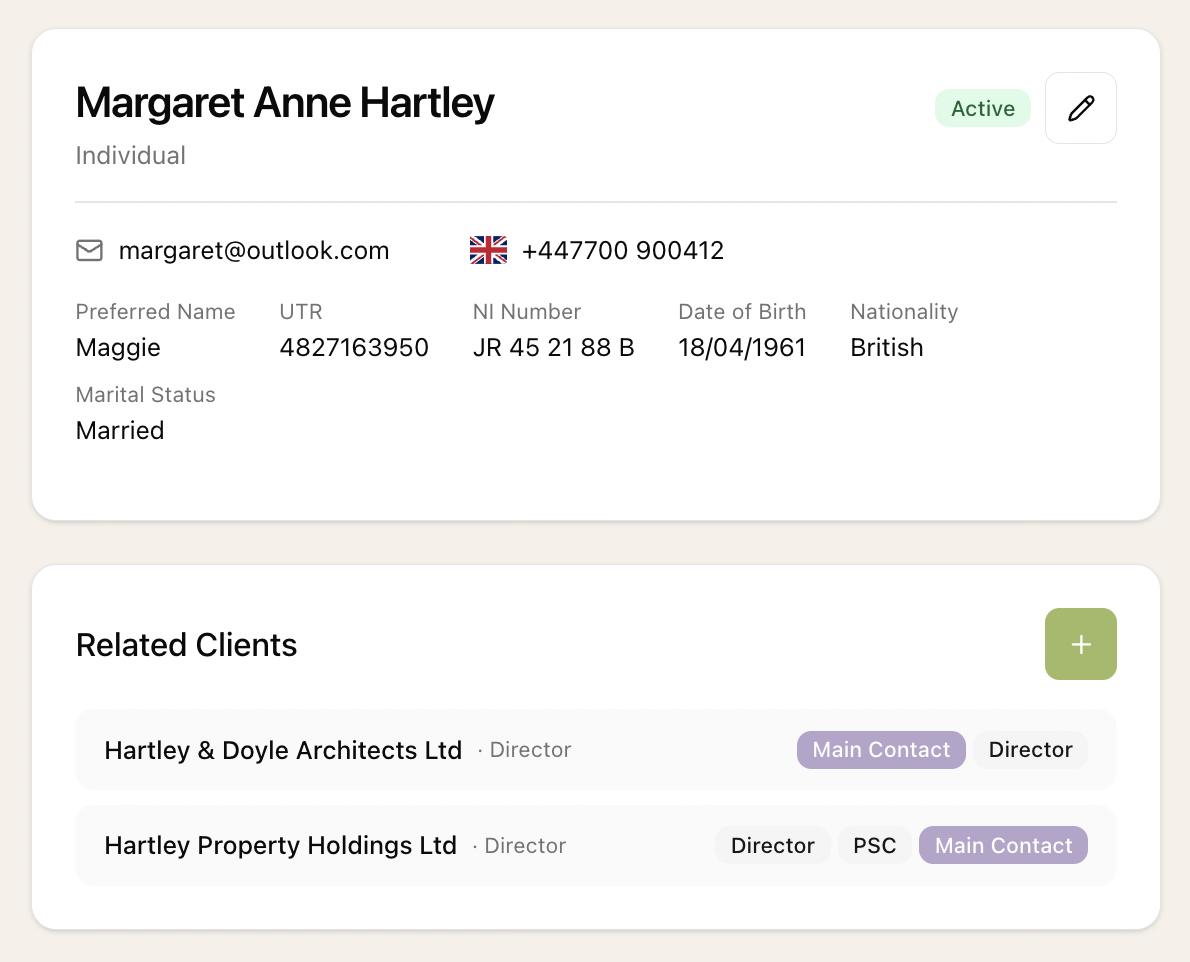
A person's record in Sodium showing their details and the two companies they are linked to, as director, PSC and main contact

Straight From Companies House

Add a limited company and its officers come with it. Directors, secretaries and persons with significant control arrive as contacts with the right role, pulled from Companies House.

Sodium recognises the same officer across companies, so someone who sits on the board of five of your clients is one contact with five links, not five separate records to keep in step.

Import and Export

Moving from another system usually means a contacts spreadsheet, whether it comes from Engager, Pixie, BrightManager or QuickBooks Practice Manager. Sodium's contacts import reads it row by row, so a client with five directors and a bookkeeper gets all six in one go. Each row finds its client however your file identifies it: by name, client code, company number, internal reference or NI number. Re-running an import is safe, and people who are already in Sodium are recognised rather than duplicated.

Exporting works the same way in reverse. Download every contact, or just the ones you filter to, with each client they are linked to and their role on it, in the same format the import reads. Edit it in a spreadsheet and bring it straight back. More on import and export, and on getting all your data out.

Duplicates, Found for You

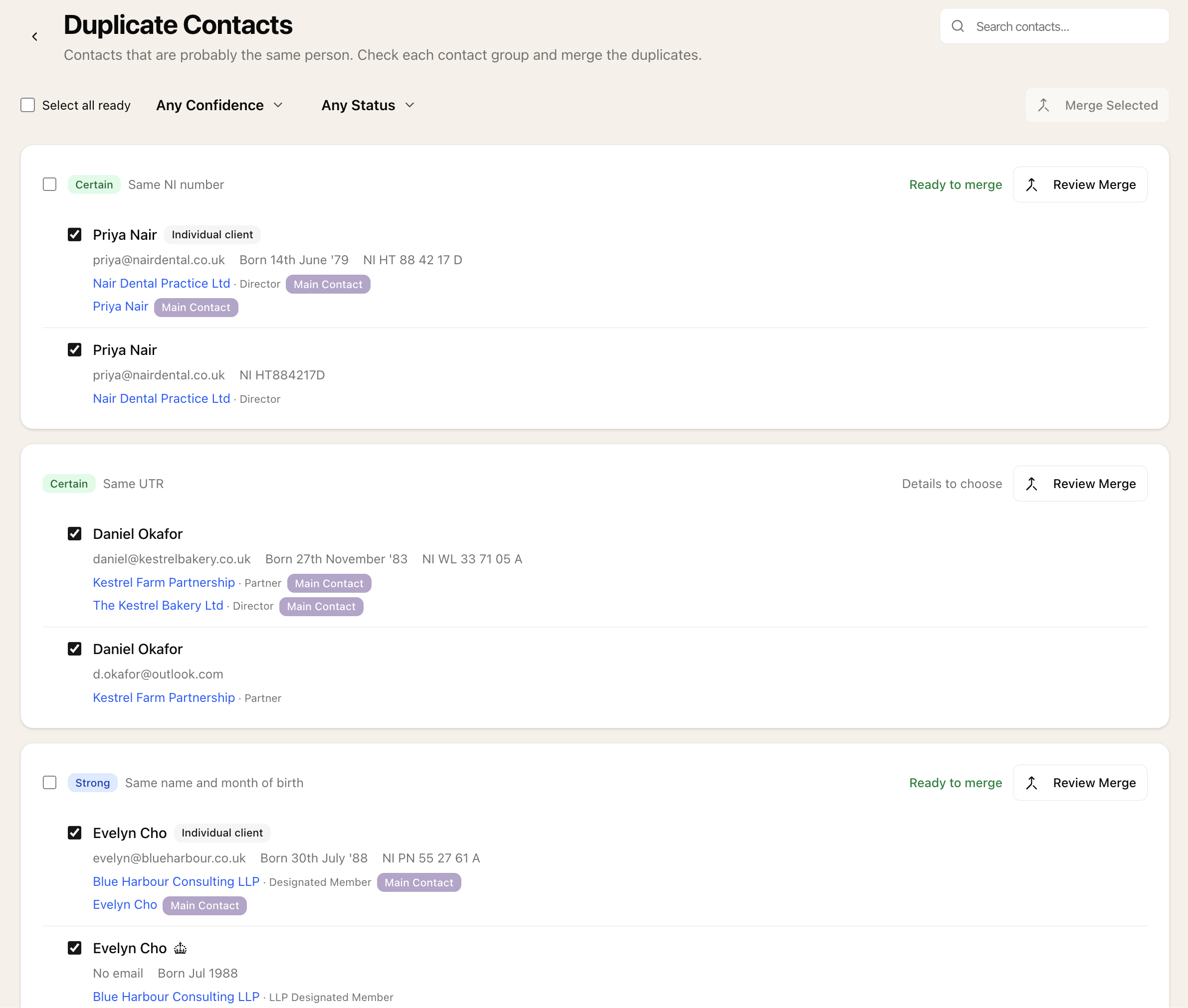
Every practice has them: the same person entered twice by two people, once from a spreadsheet and once from Companies House, or as "Robert" on one client and "Rob" on another. Sodium looks across your whole practice and groups the contacts that are probably the same person, with a confidence and the reason for it:

  • Certain - the same Companies House officer, NI number or UTR
  • Strong - the same name and month of birth, or the same name and a shared email address
  • Possible - the same name, with nothing else to confirm it

Matching is careful about names. A preferred name matches a first name, and "Ann Mary" matches an Ann whose middle name is Mary. It is careful about what rules someone out too: two people who share a name but not a month of birth, an NI number or a UTR are never suggested as the same person.

The Duplicate Contacts page showing contact groups graded Certain and Strong, with the reason for each and whether it is ready to merge

A Merge You Can See Before It Happens

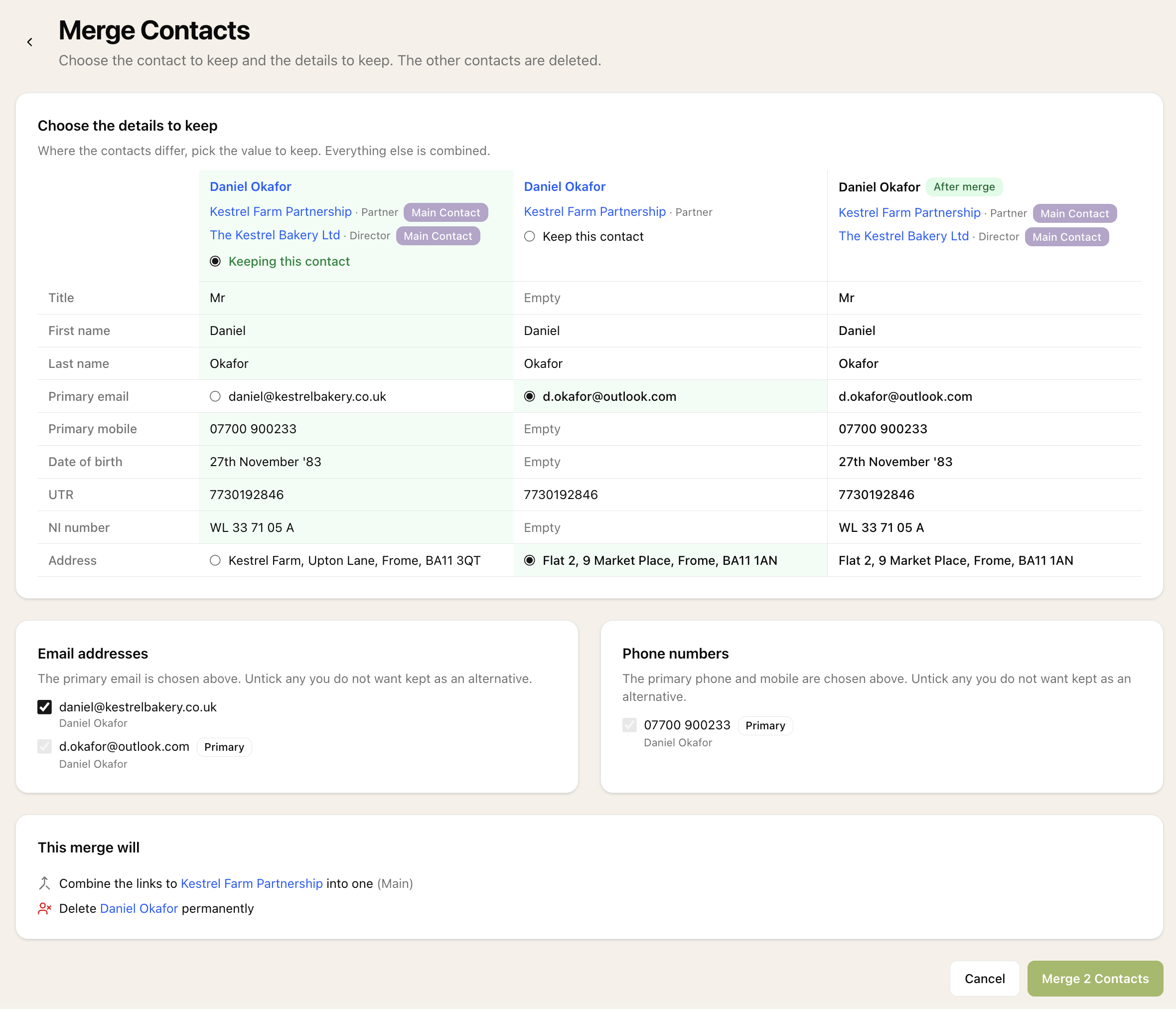
Merging contacts should never be a leap of faith. Sodium lays the contacts out side by side and shows, row by row, where they agree and where they differ. Choose the address, email or phone number to keep wherever there is a difference, and an "after merge" column shows exactly what the finished contact will look like before anything is saved.

Nothing is quietly thrown away. Every email address and phone number is kept unless you choose to drop it. Client links move across, and where two contacts were on the same client their roles are combined into one link. Portal access comes with them, and documents they uploaded or approved stay attributed to the person. Sodium suggests which contact to keep, and warns you clearly when the details suggest two different people.

The merge screen showing two contacts side by side, a choice of email and address, and the merged contact in an after merge column

Bulk Actions

After a big import, most duplicates are clear-cut: the same person with nothing to decide between. Sodium marks each contact group that is ready to merge as it stands, so you can tick them all and merge them in one go, keeping the suggested contact in each. Anything that needs a person to look at it, such as two different addresses or a possible namesake, stays on the page for you to review.

Merging deletes records, so it follows your custom roles: only the people you allow to delete contacts can merge them.

Spotted duplicates yourself? Tick them on the contacts list and merge them from there, or merge a contact straight from its own record.

Beyond the Screen

Contacts are available over the Sodium API, including finding likely duplicates and previewing a merge, and to your AI assistant through the Sodium MCP server. Ask Claude or ChatGPT for a client's directors, or to add a new contact, without opening Sodium.