
API

Sodium is built API-first. This isn't a bolt-on or an afterthought - the API is the foundation. Everything you can do in the application, you can do through the API.

This opens up a world of possibilities: build custom integrations, automate repetitive tasks, connect to other tools, and extend Sodium in ways we haven't even thought of yet.

Full Feature Parity

When we say "API-first," we mean it. Every feature in Sodium is accessible through the API:

If the UI can do it, the API can do it. No artificial limitations. It's the same API that powers our MCP server, so your AI assistant gets the same access developers do. It's also why exporting your data is never a problem — everything you put in, you can get out.
RESTful Design

The Sodium API follows REST conventions, making it intuitive for anyone familiar with web APIs:

  • Standard HTTP methods (GET, POST, PUT, DELETE)
  • Predictable URL structure
  • JSON request and response bodies
  • Meaningful HTTP status codes
  • Pagination for list endpoints

No proprietary protocols or complex authentication schemes. If you've used REST APIs before, you'll feel right at home.

Comprehensive Documentation

Every endpoint is fully documented with:

  • Request parameters and body schemas
  • Response formats and examples
  • Error codes and troubleshooting
  • Authentication requirements

The documentation is generated from the same OpenAPI specification that powers the API itself, so it's always accurate and up-to-date.

OpenAPI Specification

Download the complete OpenAPI (Swagger) specification and import it into your favourite tools:

  • Generate client libraries in any language
  • Test endpoints with Postman or Insomnia
  • Build type-safe integrations
  • Auto-generate documentation

The spec covers every endpoint, every parameter, and every response schema. Use it to build integrations faster and with fewer surprises.

Switch Keys Off for a Practice

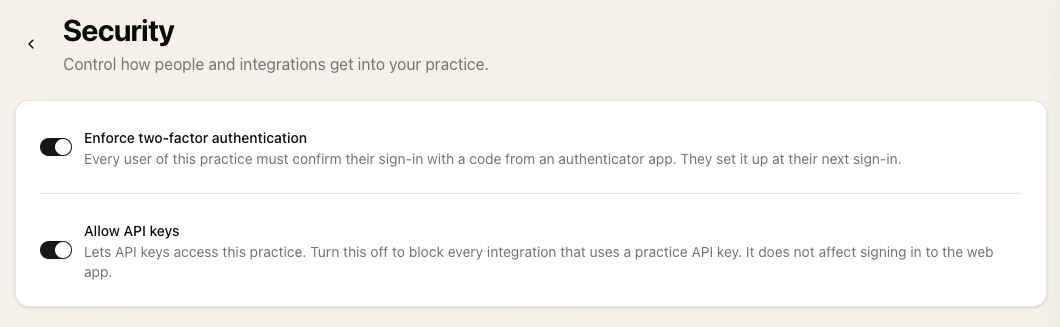
API keys let scripts and integrations reach a practice without a person signing in, and each one is created by a user and scoped to a role. If a practice doesn't use them, or wants to stop for a while, the Security page in its settings has one switch: Allow API keys. Turn it off and every key is refused, whoever created it. Signing in to the web app is not affected, and it can be turned back on at any time.

The Security page in practice settings with the Allow API keys switch

Developer?

Do you want to talk to us about a commerical integration using our API? We'd love to hear from you!