Custom Fields

Every practice tracks different information about their clients. Custom fields let you add your own data points to client records - anything from year-end dates and VAT quarters to industry codes and referral sources. Organise your fields into groups, and each group appears as its own card on the client page.

Custom date fields are particularly powerful - they can be used as triggers for recurring task scheduling, so tasks are generated based on each client's specific dates.

At a glance

  • Multiple data types, so each field holds exactly the kind of value it should
  • Fields organised into groups, each shown as a card on the client page
  • Map custom fields to forms so client answers land straight on the record
  • Drag and drop to reorder fields and groups in settings
  • Show a field only on the client types it applies to
  • Restrict a field to the services a client holds, so it only appears where the work does
  • Mark a field required, and see every client still missing one
  • Custom date fields trigger recurring tasks relative to each client's date

Field Types

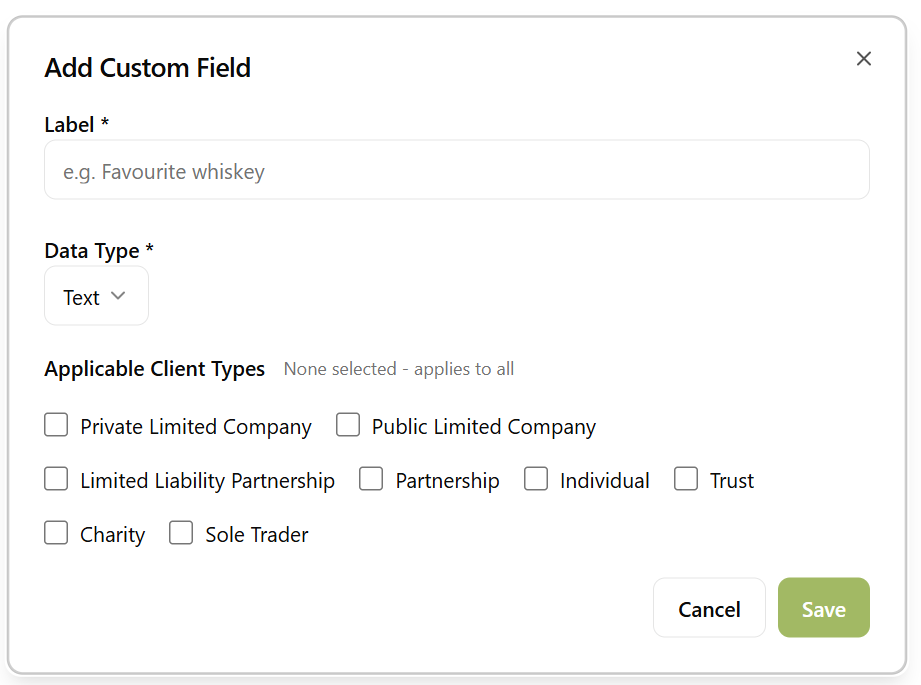
Define custom fields with the type that fits your data:

  • Text - free-form text for notes, reference numbers, or any other string data
  • Number - numeric values for things like employee counts, turnover bands, or scoring
  • Date - dates that can be used for filtering, sorting, and triggering recurring tasks
  • Dropdown - predefined option lists for consistent categorisation like industry sectors or client tiers
Add custom field dialog showing field type selection and client type checkboxes

Groups & Sub Groups

Custom fields are organised into groups. Each group appears as its own card on the client page, making it easy to find related information at a glance. For example, you might have a "Tax Information" group, a "Compliance" group, and a "Business Details" group.

Groups can also contain sub groups for further organisation. Sub groups appear as labelled sections within their parent card, keeping related fields together without cluttering the page with too many separate cards.

In the settings page, you can drag and drop fields between groups and reorder both fields and groups to match your preferred layout.

Client Type and Service Targeting

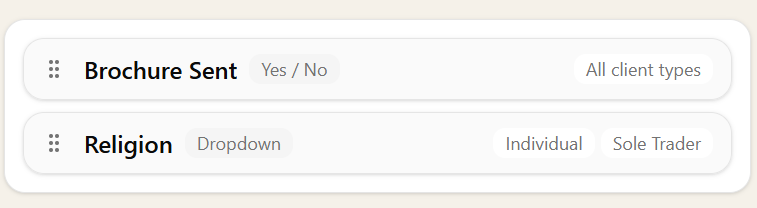
Not every custom field is relevant to every type of client. When creating a custom field, you can choose which client types it applies to - for example, a "Date of Birth" field only for individuals, or a "Gift Aid claim reference" only for charities.

Custom fields list showing client type badges

If no client types are selected, the field applies to all clients. When types are specified, the field only appears on matching client records - keeping forms clean and relevant.

It works the same way for the work you actually do for them. A field can be restricted to the services a client holds, so a "VAT scheme" field only shows on the clients you file VAT for, and a "Payroll frequency" field only on the ones you run payroll for. Nobody scrolls past questions that don't apply to them.

Because the field follows the service, adding that service to a client asks for its fields there and then, rather than leaving someone to remember them later.

Required Fields

Some of what you track isn't optional. Mark a field as required and it is flagged wherever the client record is edited, so the value gets captured while someone is already looking at the client rather than months later.

Required only helps if you can see where it's been missed, so Sodium keeps a running list of every client still short of a value, with the gaps fillable straight from that list. It is the quickest way to clean up after an import, or after adding a field to a book of clients you've had for years.

This matters most for anything that ends up in client-facing content. A missing value renders as nothing at all in an email or a document, which the client notices even when you don't.

Client Date Triggers

Sodium already includes key dates like year end and other dates pulled from Companies House. But if there's another date your practice needs to work with, you can add it as a custom date field on client records.

Custom date fields can then be used as triggers for recurring tasks. For example, create a "VAT Quarter End" date field, then configure your VAT return task to generate relative to each client's quarter date. Every client gets their task at the right time, automatically.

The same works for corporation tax deadlines, payroll reference dates, and any other client-specific date you track.