Services & Pricing

Your service catalogue is the foundation of everything in Sodium. Define what you offer, how you price it, and what happens when a client signs up - all in one place.

Services in Sodium aren't just line items on an invoice. They're connected to your proposals, tasks, workflows, and content management - creating a seamless flow from sale to delivery.

At a glance

  • One catalogue of services behind every client
  • Fixed price, per hour, per day, or per unit you name yourself
  • Monthly, quarterly, annual or one-off billing frequencies
  • Optional one-off set-up fee alongside the recurring price
  • Quantities that vary each period held for confirmation
  • Revenue-band and volume tiers for size-based pricing
  • AI-assisted pricing factors you can edit or write yourself
  • Prices overridable per client, without leaving the catalogue
  • Packages that bundle services at a negotiated price
  • VAT rates per service, carried through to invoices
  • Feeds proposals and client billing automatically
  • Drives tasks, workflows and service stages on sign-up
  • Import and export your whole catalogue as CSV
  • Categories, client-type rules and bulk assignment

Services Are the Heart of the System

Almost everything in Sodium flows from your services. They aren't just line items on an invoice — they're the central definition that drives billing, work, documents, and compliance across the whole system.

  • Pricing — each service defines how it's priced, which drives client billing.
  • Tasks — services carry onboarding and recurring tasks that automatically generate the work your team needs to do. Clients who need those tasks on different dates go on their own client schedule, so one service covers them all.
  • Content — services specify the content that ends up in your proposals and engagement letters.
  • Compliance — services define PCL items and the agent authorisations required to do the work.
  • Stages — services define stages that drive kanban boards, giving you a live view of where every piece of work stands.

Because all of this is linked back to the service, defining a service once wires up billing, tasks, documents, compliance, and progress tracking together. It's incredibly powerful.
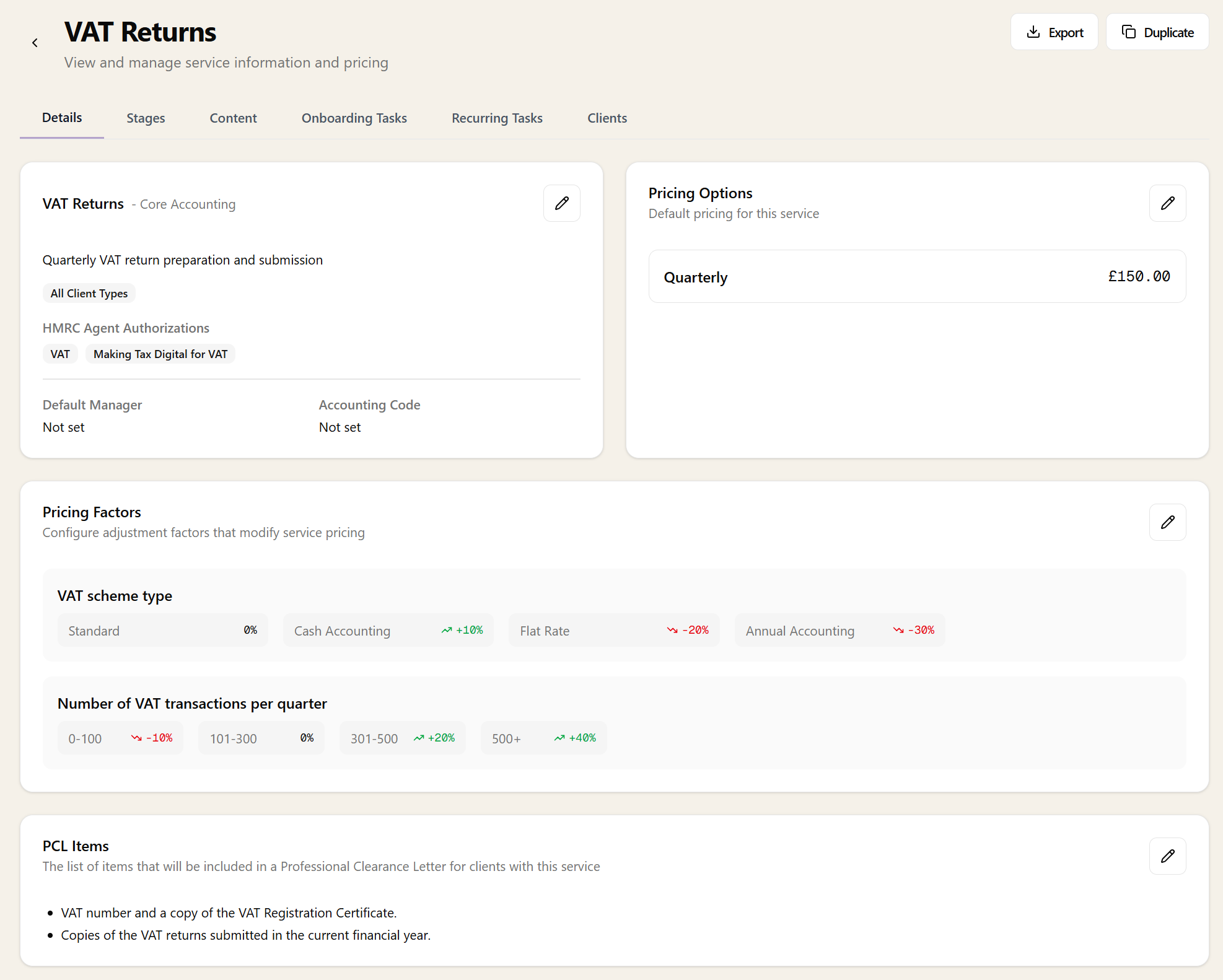
A VAT Returns service in Sodium showing pricing options, pricing factors for VAT scheme type and transaction volume, and PCL items

Service Library

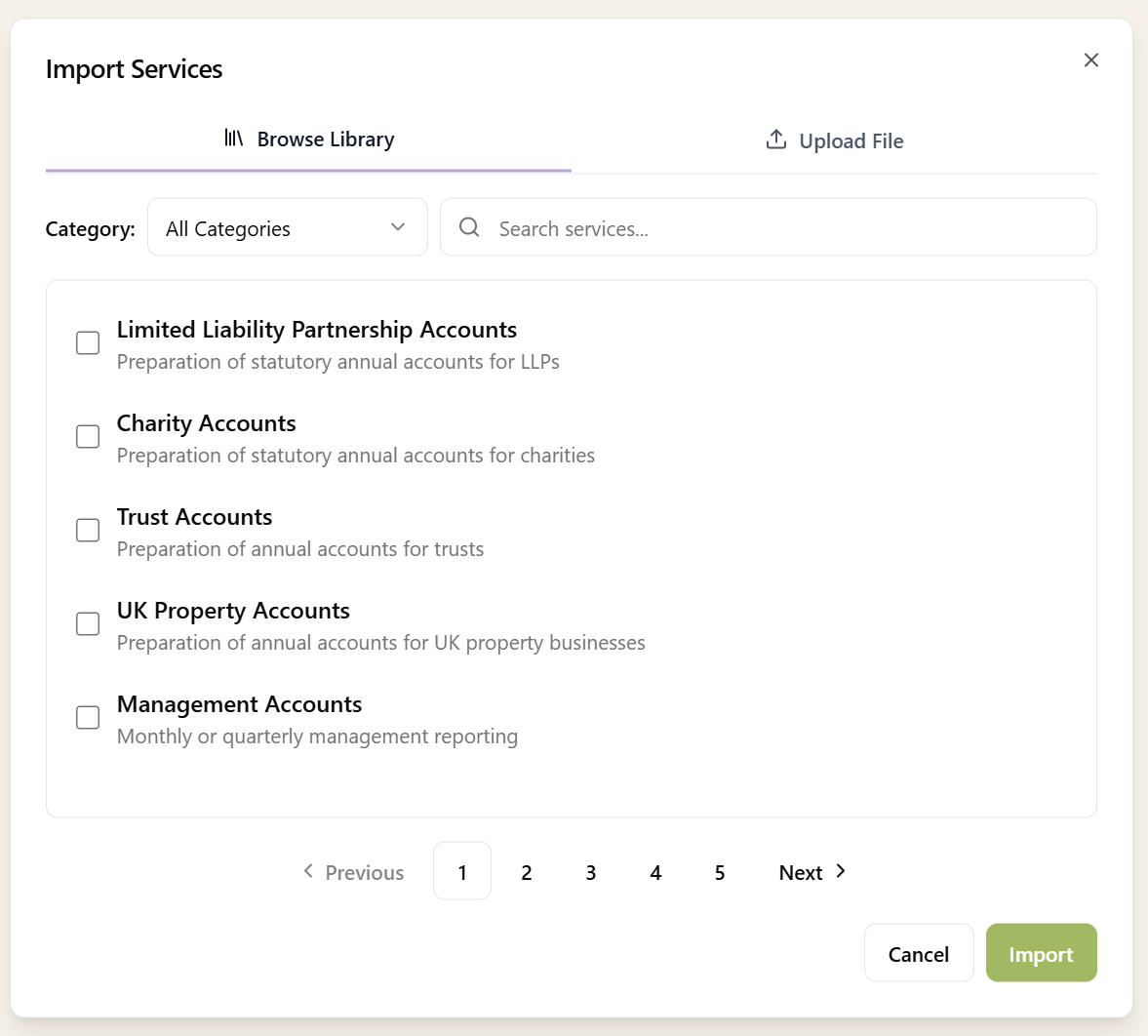
Importing services from the Sodium library, browsing pre-configured services like LLP, charity, trust, and management accounts by category

You don't have to create everything from scratch. Sodium includes an extensive library of pre-configured services covering common accountancy offerings - from annual accounts and tax returns to bookkeeping, payroll, and company secretarial work.

When you add a service from the library, Sodium sets up everything you need to deliver it:

  • One-off onboarding tasks - Initial setup work for new clients taking this service
  • Recurring tasks - Scheduled work that repeats monthly, quarterly, or annually
  • Workflows - Step-by-step processes attached to tasks

Everything is fully editable. Use the library defaults as a starting point, then customise to match exactly how your practice operates.

Created a service configuration you're proud of? Export it and send it to us. We'll review it and add it to the library so other firms can benefit from your approach.

Import & Export Your Catalogue

Your whole service catalogue can be exported to CSV — names, descriptions, categories, VAT rates, pricing at every billing frequency, set-up fees, even your engagement letter terms. Edit it in a spreadsheet and re-import it: each row keeps its service code, so changes update your existing services rather than creating duplicates.

Switching from Ignition? Upload its services export directly. Sodium detects the format automatically, converts descriptions to clean text, suggests the right category for each service, and turns the engagement terms into reusable content blocks linked to each service — identical terms are shared rather than duplicated.

Either way, nothing is created until you say so. Every import shows a preview of the services found — with editable prices, frequencies, and categories — so you tick exactly what you want and adjust anything that needs it first.

Flexible Pricing Options

Not every service is priced the same way. Sodium supports multiple pricing frequencies to match how you actually bill. Annual, Quarterly, Monthly or One-Off.

You can set a default price and frequency for each service, but override it per-client when needed. The same service can be billed differently to different clients.

Charge a Flat Fee, or a Rate × Quantity

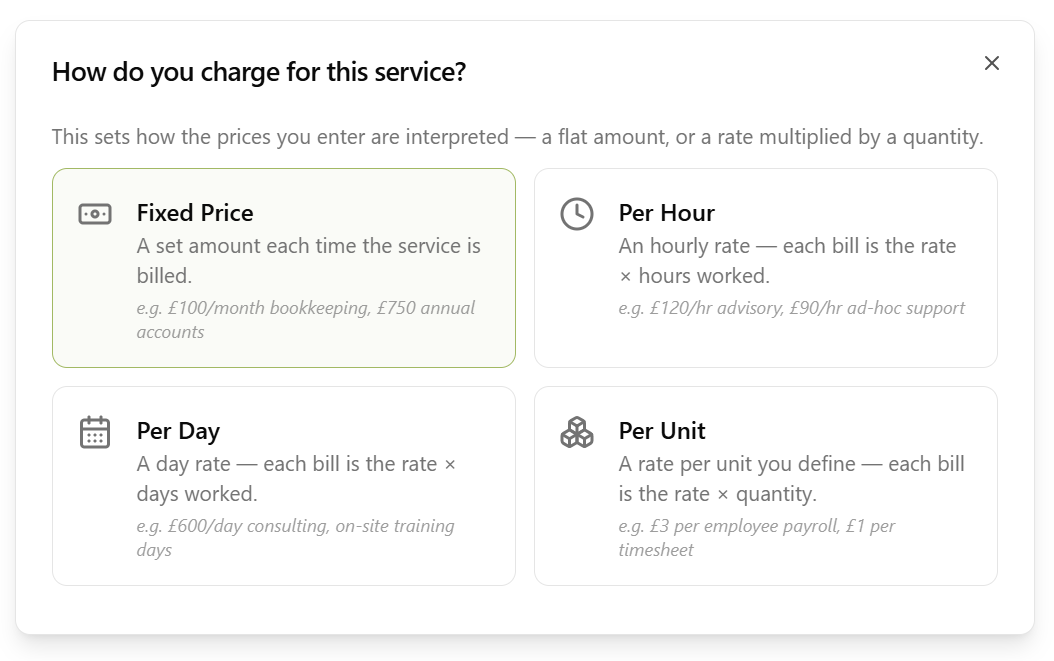
Plenty of work isn't a flat monthly fee. Payroll is priced per payslip. Advisory is priced by the hour. Consulting is priced by the day. Every service in Sodium has a charging basis that decides how the price you enter is read:

  • Fixed price — a set amount each time the service is billed. £100/month bookkeeping, £750 annual accounts.
  • Per hour — an hourly rate. Each bill is the rate × hours worked.
  • Per day — a day rate. Each bill is the rate × days worked.
  • Per unit — a rate per unit you name yourself. £3 per payslip, £1 per timesheet, £2.50 per employee.

For per-unit services you choose the unit name, and it follows the price everywhere it's shown — on the service, on the client record, on proposals and on the invoice line: 12 × £3.00 per payslip. Per-hour and per-day services already know what their unit is.

A guided set-up walks you through it when you price a service: pick the basis, name the unit if you need one, say roughly how much you bill each period, then enter the rates for whichever billing frequencies apply.

The service pricing set-up asking how you charge for this service, with Fixed Price, Per Hour, Per Day and Per Unit options each showing an example

Quantities: Set One, or Leave It Open

A rate on its own doesn't tell you what to invoice - you also need a quantity. Sodium lets you set a typical quantity per billing period on the service, which pre-fills whenever you assign that service to a client and can be adjusted there.

If the volume genuinely varies from client to client, leave it blank or at zero. The rate is still defined; the quantity just gets filled in per client. A blank quantity is treated as unknown rather than free — proposal totals leave an open-ended rate out of the figure instead of quietly showing £0 as if it were the price.

When the Quantity Changes Every Period

Payroll headcount moves. Advisory hours are never the same two months running. For services like these, tick quantity varies each period and Sodium stops guessing on your behalf.

Every billing line generated for that service is created as Pending, no matter what your auto-approval settings say. The line arrives pre-filled with the last known quantity so you're confirming a number rather than typing one from scratch — 47 payslips this month instead of last month's 45 — and only then does it flow through to the invoice.

Leave it unticked and the service behaves like any other: billing lines use the saved quantity and follow your normal approval settings, auto-approving straight through if that's how the client is set up.

The setting is a default on the service and can be changed per client - so a retainer client on a steady 20 hours a month can auto-approve while everyone else on the same service gets held for confirmation.

It carries into packages too. Where a package bundles a variable-quantity service and has no negotiated lump price, the package's billing line is an estimate — so it's held as Pending for review as well.

Set-Up Fees

A service's price is usually recurring - billed every month, quarter, or year. Sometimes there's also a one-off cost right at the start: onboarding, initial setup, a data migration. You can now add an optional set-up fee to a service to cover exactly that.

The set-up fee is charged in addition to the recurring price, not instead of it. The first time the service is billed for a client, they're charged the recurring fee plus the one-off set-up fee; from then on, just the recurring fee. Like the recurring price, the default comes from the service and can be overridden per client. Service packages can carry their own set-up fee too, added once when the package is first invoiced.

Pricing Factors

Real-world pricing is rarely one number. The fee for bookkeeping might depend on transaction volume. A tax return gets more involved with each additional income source or rental property. Sodium handles this with pricing factors - variables that adjust the base price based on client circumstances.

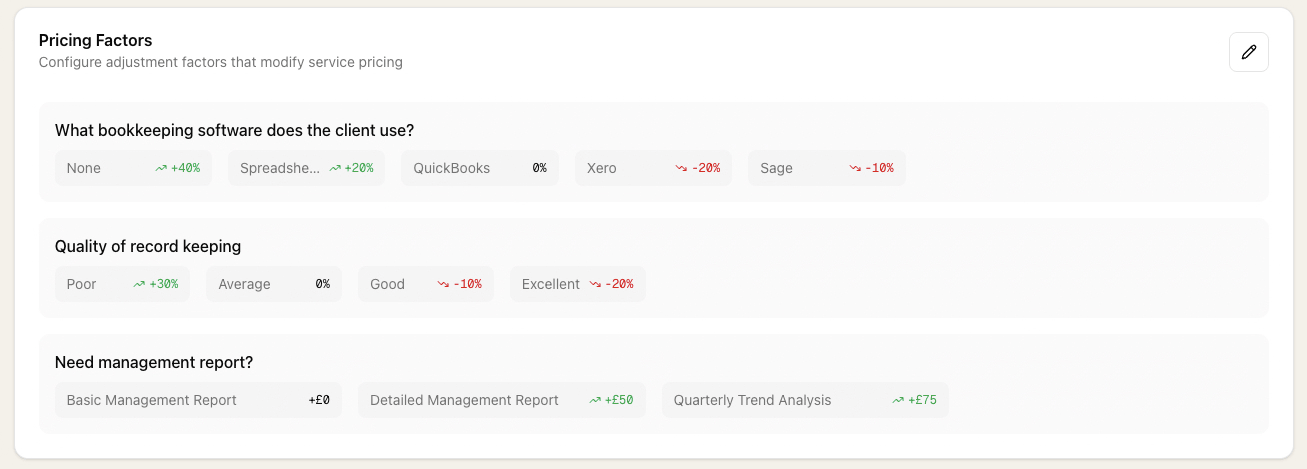
Each factor can adjust the price as a percentage or as a fixed amount in pounds - whichever fits how you price. Some firms prefer percentages for bookkeeping (e.g. +20% for poor record-keeping) and fixed amounts for tax return add-ons (+£40 per rental property). Others do the opposite. Mix and match per factor, per service, however your practice prices.

When you add a new service, AI suggests relevant pricing factors automatically. For bookkeeping, it might suggest:

  • Quality of record-keeping (good, average, poor)
  • Accounting software used (Xero, QuickBooks, spreadsheet)
  • Transaction volume brackets

Each option can add or subtract from the base price, giving you nuanced and consistent pricing without complex spreadsheets.

You can of course create your own pricing factors from scratch too. AI is there to help, not dictate.

Pricing factors configuration showing percentage and fixed-amount adjustments that modify service pricing

Revenue Ranges

Many firms price by client size. Sodium makes this easy with fully customisable revenue ranges. Define your own brackets. For example:

  • Up to £100k
  • £100k - £500k
  • £500k - £1m
  • £1m - £5m
  • £5m+

Then set pricing for each service on a per-range basis. When you add a client and select their revenue range, pricing automatically adjusts across all their services.

Revenue ranges are completely customisable - use whatever brackets make sense for your practice.

Tiered Pricing

Some services don't fit neatly into a single price or revenue range. Payroll is a classic example - the fee depends on how many employees the client has. Sodium handles this with tiered pricing, where you define your own price bands on a per-service basis.

Set up as many tiers as you need - for example, 1-5 payslips, 6-10, 11-25, 26-50, and so on - each with its own price. When you assign the service to a client, just select the relevant tier and the pricing is set automatically.

Tiers and per-unit rates solve the same problem in two different ways, and you can use whichever matches how you quote. Tiers give you a flat price per band (£45 for 6-10 payslips). A per-unit rate charges the same amount for every one (£3 per payslip, whatever the count). Firms that publish a price list usually want tiers; firms that quote a rate usually want per-unit.

Service Content

Each service can define content that appears in client-facing documents. Using the content management system, you can set:

  • Proposal text - What appears in proposals for clients taking this service
  • Engagement letter terms - Service-specific T&Cs and scope definitions
  • PCL items - What to request in professional clearance letters for clients with this service

This means your proposals and engagement letters automatically include the right content based on which services the client is taking.

Automatic Task Generation

Services aren't just about pricing - they're about delivery. Each service can be linked to:

  • Recurring tasks - Tasks that repeat on a schedule (monthly bookkeeping, quarterly VAT, annual accounts)
  • Workflows - Multi-step processes attached to those tasks
  • Onboarding tasks - One-off tasks created when a client first takes on the service

When a client accepts a proposal or you manually add a service to their account , then the relevant tasks and workflows are automatically created. You and your team knows exactly what needs doing without anyone manually setting it up.

Agent Authorisations

Some services require specific HMRC agent authorisations to be in place. When configuring a service, you can specify which agent authorisations are required. Sodium then surfaces any missing authorisations on the client record, so you can see at a glance which clients still need authorisations setting up before you can start work.

VAT on Services

If your practice is VAT registered, you can set the VAT rate on each service. Configure your VAT registration in Settings and then choose the appropriate rate for each service - Standard, Reduced, Zero, Exempt, or Out of Scope.

The VAT rate is automatically reflected in your proposals, so clients see accurate pricing including VAT from the outset.

Service Stages

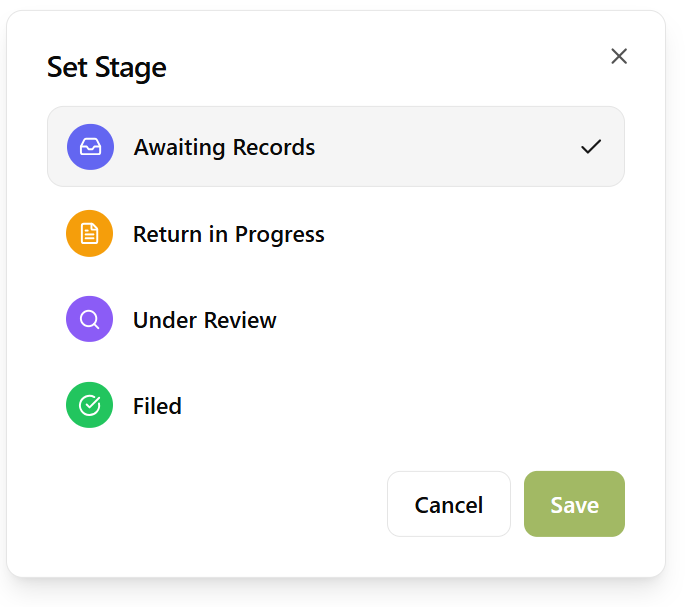
Setting the stage on a client's service: Awaiting Records, Return in Progress, Under Review, or Filed, each with its own icon and colour

Define custom workflow stages on each service — like "Information Gathering", "In Progress", "Under Review", and "Filed". Each stage has a name, icon, and colour for instant recognition.

Stages can be set manually on a client's service, or advanced automatically by "Set Service Stage" workflow steps. As work progresses through the workflow, the stage badge on the client's service updates to reflect exactly where things stand.

Service Categories

Organise your services into categories that make sense for your practice:

  • Core Accounting
  • Tax
  • Payroll
  • Company Secretarial
  • Advisory
  • Software & Training

Categories help when building proposals and reporting on revenue by service type.

Packages

Most clients take a similar set of services. Rather than adding each one individually every time, group them into a service package and apply them all in a single click - with optional package-level pricing and proposal content overrides.

Client Type Filtering

Not all services apply to all client types. Limited company services shouldn't appear for sole traders. Sodium lets you specify which client types each service is available for:

  • Private Limited Company
  • LLP
  • Partnership
  • Sole Trader / Individual
  • Trust

When creating a proposal, only relevant services are shown for the client type.

Bulk Client Management

Every service has a Clients tab showing which clients have that service assigned, with their pricing, status, stage, and billing settings at a glance.

From this tab you can manage assignments in bulk:

  • Add clients — search and select multiple clients, set the billing frequency, price, start date, status, and managed-by user, then assign them all at once. The service's default pricing and manager are pre-filled.
  • Update pricing — select assignments and change the billing frequency, set a custom price, or reset to standard pricing in one action.
  • Set status or stage — move selected assignments to a new status (Active, Inactive, Paused, Proposed) or workflow stage.
  • Remove assignments — remove selected assignments with a confirmation step. Assignments with billing history are protected and must be marked inactive instead.

Assignments that belong to a service package are automatically protected during bulk pricing updates to preserve package pricing integrity. Status and stage changes apply to all assignments regardless.

You can also export the Clients tab to CSV — filtered to just that service — edit it in a spreadsheet, and re-import to update assignments in bulk.

Want to learn about other capabilities?

Explore all features

Have questions or suggestions?

Get in touch