
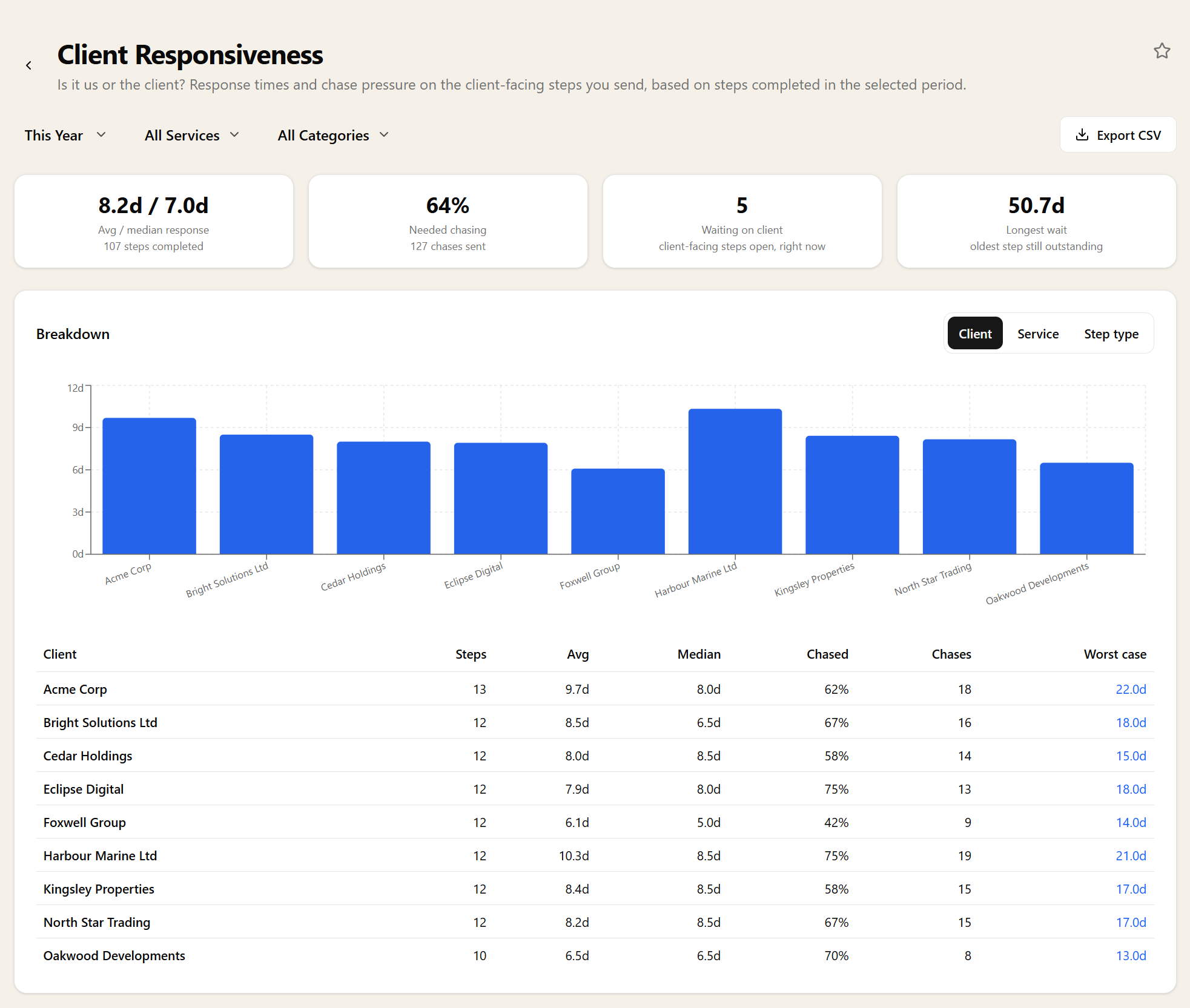
Client Responsiveness
Is it us, or is it the client?
How quickly clients answer the confirmations, document requests, forms and approvals you send them, how much chasing it takes to get there, and what is still waiting on a client right now.
The conversation you can now have with evidence
Every practice has a handful of clients who make every job harder, and most partners could name them from memory. This puts numbers behind that instinct — response times and chase counts per client — which is what turns an awkward conversation about fees or deadlines into a factual one.
It also protects your team. When a service consistently runs late, the first question is usually whether someone is slow. Often the answer is that the client took three weeks to send records, and this is where that shows.
What counts as a client response
The report measures the four things you actually send a client and wait on: client confirmations, document requests, data forms and document approvals. Each one is timed from the moment it went out to the moment the client dealt with it, so a response time here is genuinely the client's clock rather than yours.
Nothing needs configuring for this to work. If your workflows already contain those steps, the history is already there — the report simply reads it.
Chasing is the hidden cost
Alongside response time, each row carries the number of chase messages sent and the percentage of requests that needed chasing at all. A client who answers in four days having been chased twice is not the same client as one who answers in six days unprompted, even though the second looks worse on response time alone.
That chase count is the closest thing you have to a measure of what a client costs you in admin, and it is the figure that most often explains why a nominally profitable client is not.
What is sitting with a client right now
The period figures are backward-looking, so the report also carries a live count of requests currently outstanding and the age of the oldest one. That pair is the bit worth glancing at between reviews: a single ninety-day-old approval nobody has thought about since is exactly the thing that turns into a missed deadline.
Cut it the way the question is asked
Break it down by client, by service, or by the type of step you sent — because "clients are slow with us" and "clients are slow at approving accounts specifically" call for different fixes.
Grouping by step type is the one that usually pays for itself. If document requests come back in three days and approvals take three weeks, the problem is not your clients, it is the approval step — and that is a wording or a routing change, not a relationship conversation.
Filtering, drilling in, and getting it out
Pick a preset period or your own dates and narrow by service, client or task category. Any row clicks through to the requests behind it, so a client with a bad average leads straight to the specific requests that made it bad.
Export to CSV before a fee review, pin the outstanding count to your dashboard, or ask for it through the MCP server.
Related reports
These answer the question next door. If this report tells you something is wrong, one of them usually tells you why.
Related features
The parts of Sodium this report reads from — set these up and the report fills itself in.