
Tell your other systems the moment something changes
Your practice doesn't run on one system. The CRM, the reporting database, the spreadsheet a partner swears by, the automation that sends a welcome pack: each needs to know when something changes in Sodium. Add a client, archive one, create a task or complete it, and Sodium sends the news straight to the places you choose, usually within seconds.
The problem
Keeping another system in step means asking, over and over
Without webhooks, the only way to know something changed in Sodium is to keep checking. Mostly the answer is no, and when it is yes you find out late. A webhook turns that round: Sodium tells your system, and it acts on it straight away.
- Out of date by morningThe dashboard shows last night's export, not today's work.
- Copied across by handSomeone remembers to add the new client to the CRM. Or doesn't.
- Archived, but still mailedA client who has left stays on the marketing list.
How it works
News, not polling
- 1
Something changes
A client is added, updated or archived, or a task is created or completed, however it happened.
- 2
Sodium sends the news
A short, signed message goes to each address that wants that event, usually within seconds.
- 3
Your system acts on it
The CRM, the dashboard or the automation picks it up straight away, with nobody copying anything across.
- 4
Every send is logged
If the other end is down, Sodium keeps trying. Either way, the delivery log shows what happened.
The moment it happens
Your other systems hear about it straight away
When a client is added, updated or archived, or a task is created or completed, Sodium tells the systems you choose. It doesn't matter how the change happened: by hand, from an import, through the client portal or from a sync, each one sends its event.
- New, changed and archived clients
- New and completed tasks, including those from recurring schedules, imports and onboarding
- Changes from the client portal and syncs, not just the ones made by hand
Your choice
Each system gets the events it wants, and as much as it needs
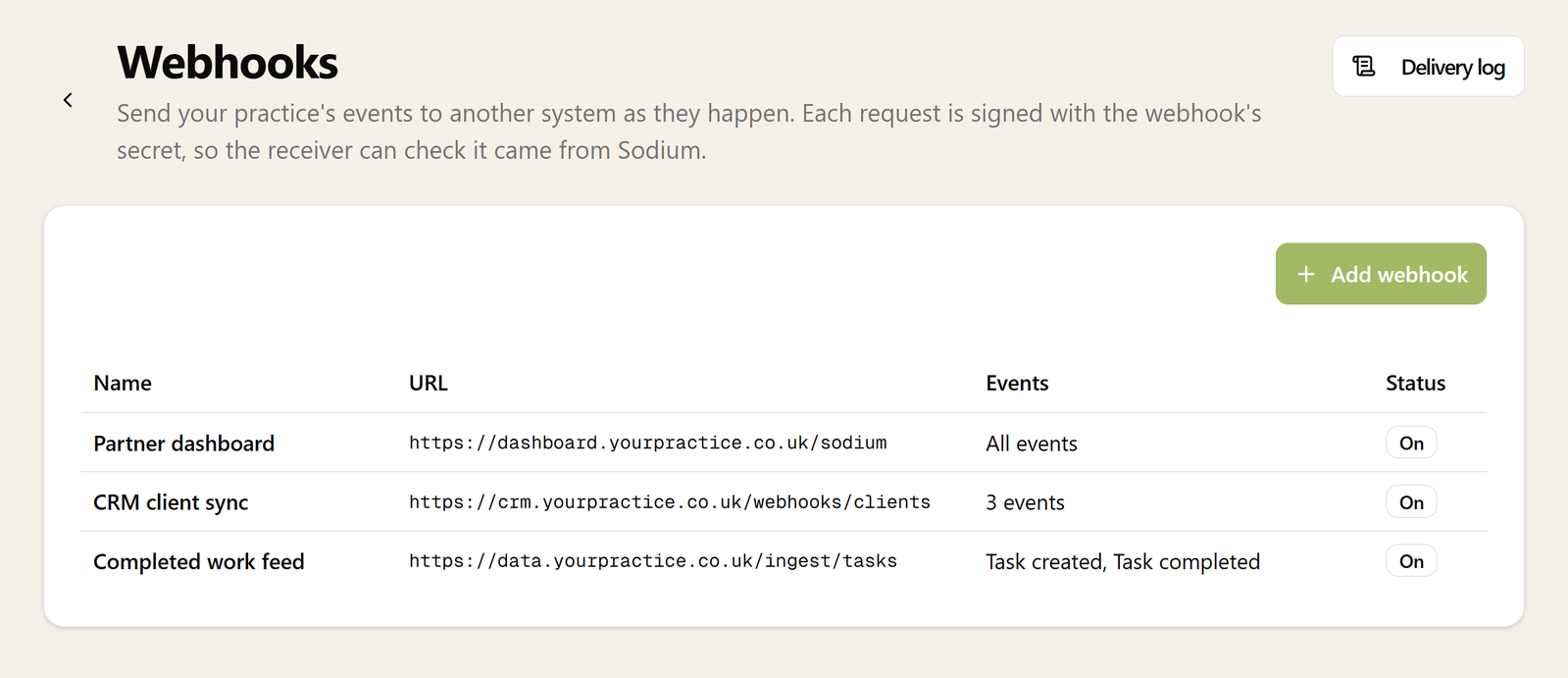
Each webhook listens for the events it cares about, or for all of them, and all includes any Sodium adds later. Send the full record so the other end can act without asking for more, or send only a reference and keep client data out of the message altogether.
- Pick the events for each webhook, or all of them
- The full client or task record in the message
- Or a reference only, with the details fetched over the API using the practice's own key
Where it helps
Connect Sodium to the rest of the practice
A CRM or marketing list that stays current
New clients appear as they are added, details follow when they change, and an archived client drops off without anyone remembering to do it.
A data warehouse or in-house dashboard
Completed tasks land as they happen, so the numbers the partners look at are today's, not last night's export.
Automations in Zapier, Make or Power Automate
Each can start a flow when a webhook arrives at an address it gives you. Point Sodium at it and a completed task can post to Teams or add a row to a sheet.
Your own software
Tools you or a partner build for the practice get a reliable feed of what changed, without a scheduled job to go and look.
Secure
Your systems know every message came from Sodium
Every message is signed with a secret only your webhook and your receiving system know, in the open Standard Webhooks format, so the other end can check it came from Sodium and wasn't changed on the way.
- Every message signed, with ready-made libraries to check it in most languages
- Sent only to secure https addresses
- Replace the secret whenever you like
Retried
A receiver that's down for the weekend still gets everything
Systems go down. When the other end doesn't answer, Sodium keeps trying, spacing the attempts out over about three days. What it won't do is keep shouting into the void: a webhook whose address keeps failing is switched off, and your admins are told which one and why.
- Retries spread over about three days
- A webhook that keeps failing switched off, not left failing for ever
- Your admins told in Sodium and by email
- Switch it back on and it carries on from there
Delivery log
Did the CRM ever hear about that client? The log says
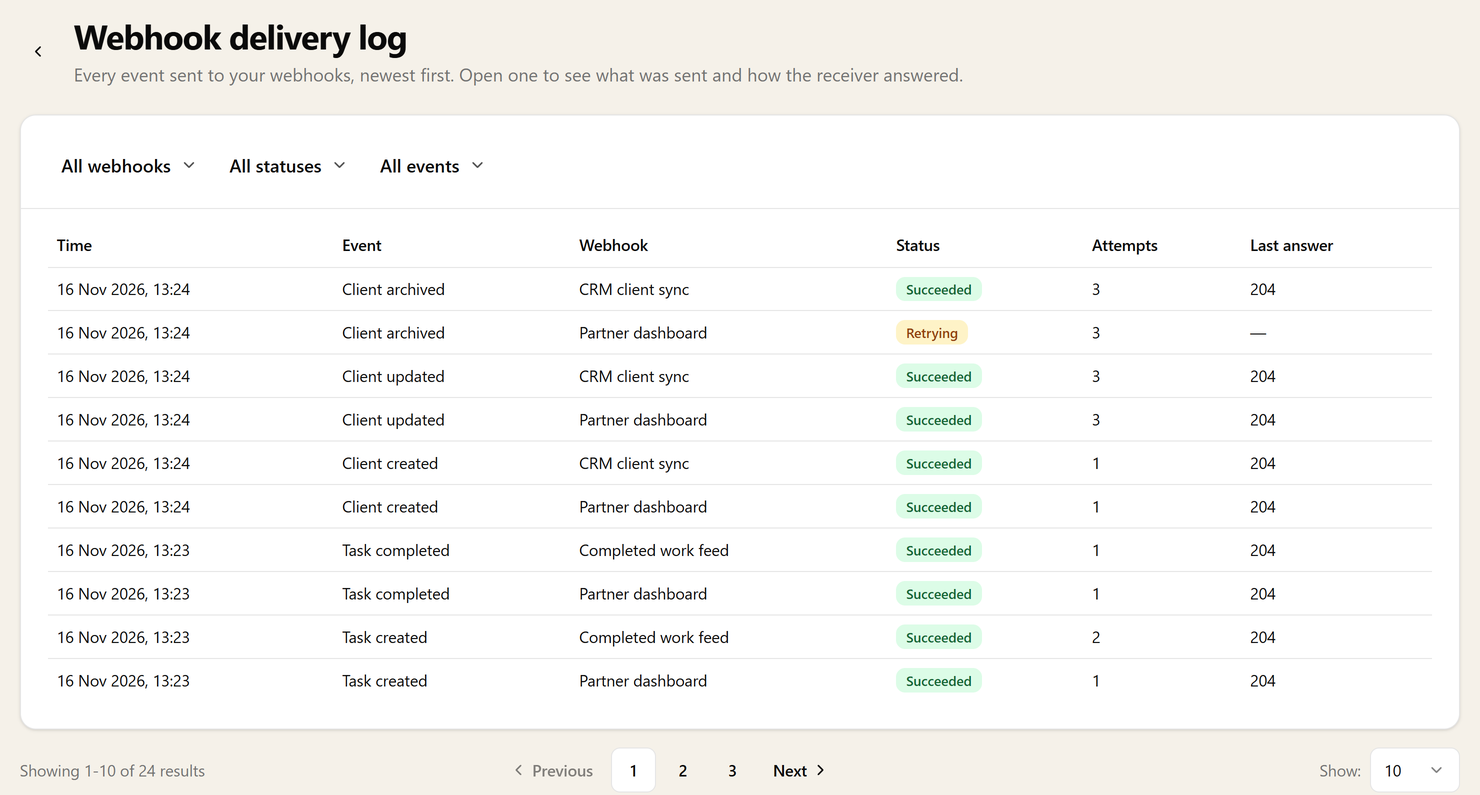
Every event sent to every webhook is in the delivery log, newest first: whether it got through, how many attempts it took and what the receiving system said back. Open one to see exactly what was sent.
- Filter by webhook, status or event
- Send again a delivery that failed for good, once the other end is fixed
- Send a test whenever you want to check a connection works
Yours to control
Client data leaves only when the right people say so
Webhooks send client data out of Sodium, so who can set them up is part of your roles. Admins can manage them from the start; anyone else needs the permission given to them.
- Managed in Settings, or over the API by an integration you build
- Admins from the start, other roles with the Webhooks permission
- Part of the Pro package
For developers
Everything a developer needs, in one guide
The events and what each one carries, checking the signature, retries and duplicates, and managing webhooks and reading the delivery log over the API.
Standard Webhooks
An open format, with ready-made libraries to check the signature in most languages.
The webhooks guide
Events, payloads, signatures and retries, with code to copy.
Read the guideAll in the API
Everything the settings screen does, so an integration can register its own webhook.
The Sodium API