
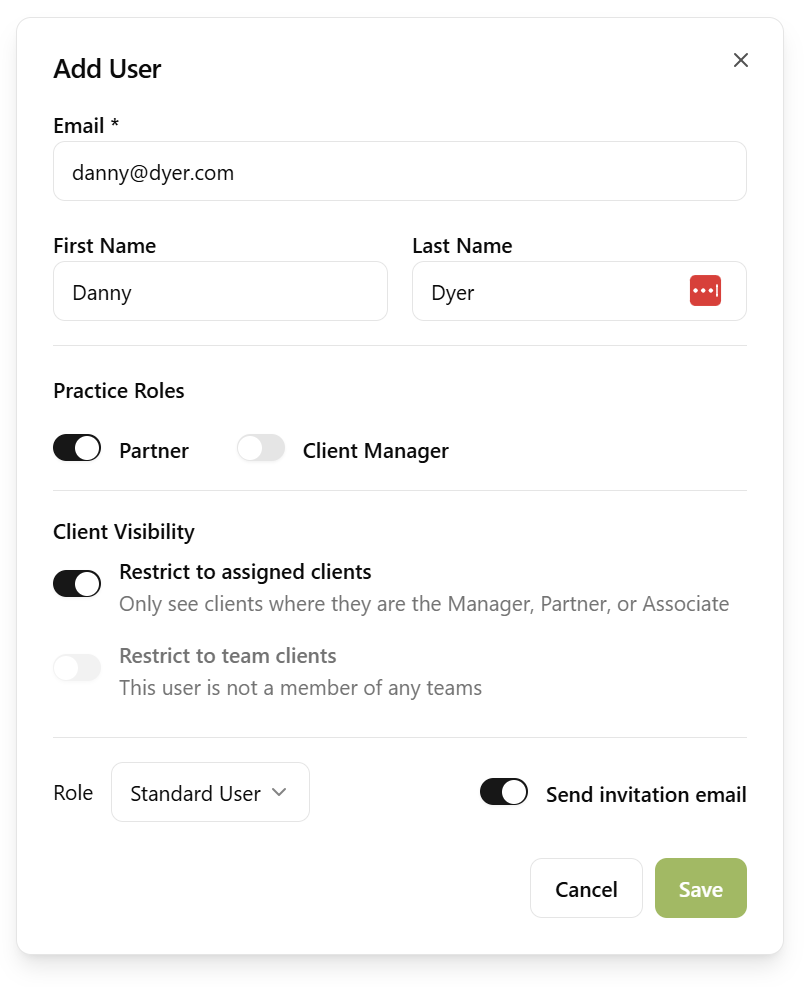
Adding people to your practice is simple. Send email invitations directly from Sodium. When inviting someone, you choose their level of access so they have the right permissions from the start.
Track the status of every invitation - pending, accepted, declined, or expired. If an invitation expires before someone accepts, retry it with one click rather than starting from scratch.
Not everyone in your practice needs to see every client.
If you have contractors, outsourced bookkeepers, or temporary staff, you can lock down exactly which clients they can access. Assign users to one or more teams and restrict their access to only the clients assigned to those teams.
Alternatively, restrict a user to only the clients assigned directly to them — for example, as the client's Manager or Associate. You can also combine both approaches, so a user sees clients from their teams plus any clients where they're personally assigned.
The same idea applies to time. Switch a user to own time only and they see, log and edit their own hours and nothing else — no colleagues' entries, no billing time to clients, no practice-wide time reporting.
The restricted access feature is perfect for practices that use external contractors or have ring-fenced teams — everyone stays productive without seeing data they shouldn't.