
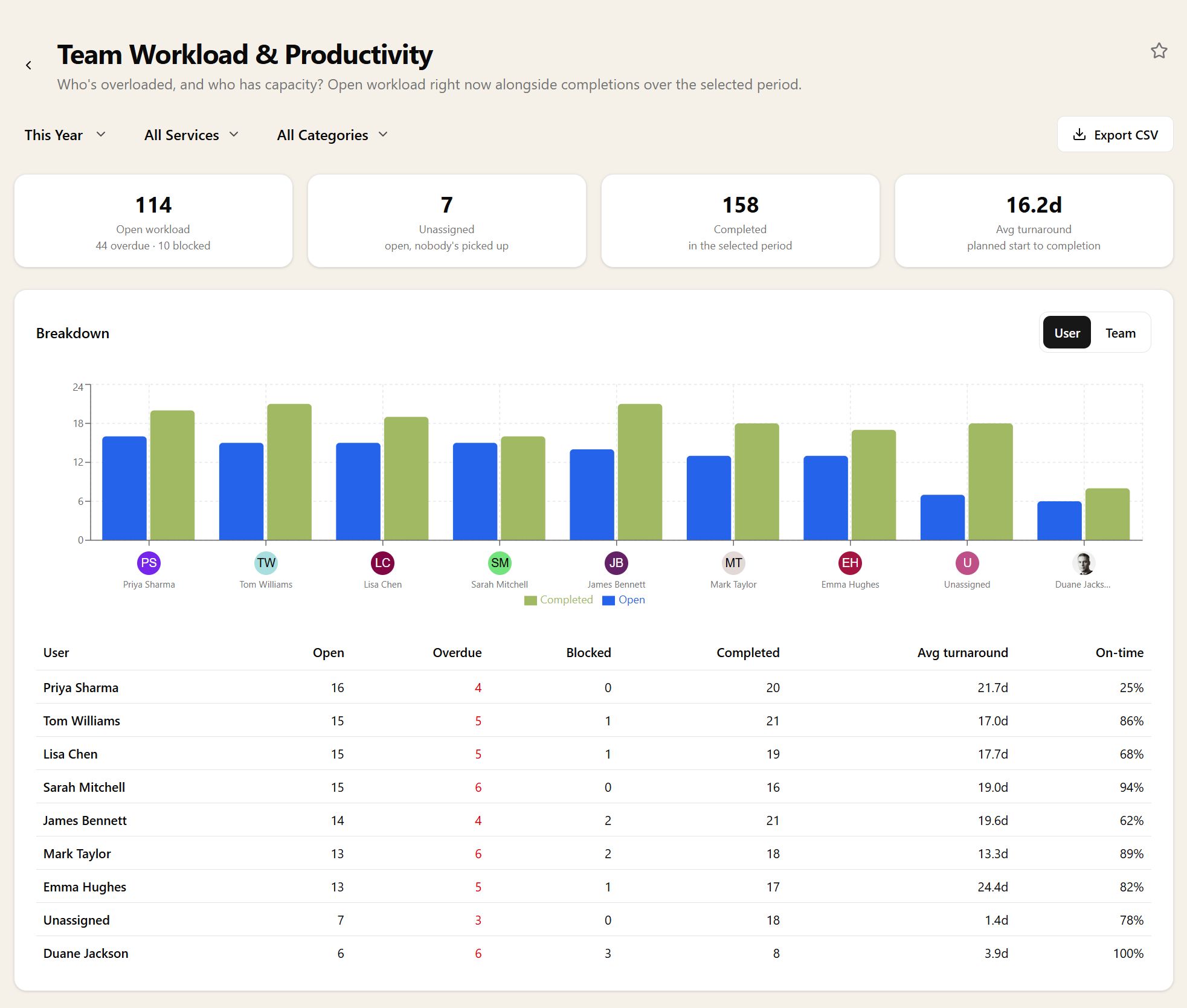
Team Workload & Productivity
Who is overloaded, and who has capacity?
Open workload per person as it stands right now — open, overdue and blocked — set against completions, average turnaround and on-time rate over the period.
Now and over time, together
A snapshot of who is buried today answers a different question from how much someone got through last month, and you usually need both at once. Someone with a large open pile and a strong completion rate is coping; the same pile with a slipping on-time rate is the person to reassign work from this week.
The two halves are labelled as what they are, because mixing a live count with a period total in one table is how workload reports normally mislead. Open, overdue and blocked are as of right now; completions, turnaround and on-time rate are for the window you chose.
By person or by team
Group by user for individual conversations, or by team when you are deciding where a new client's work should land. Blocked work is called out separately, because that is capacity you can free without moving anything — it is usually waiting on someone else.
Unassigned work gets its own figure too. Nobody feels responsible for a task with no name on it, which is why unassigned piles are the ones that go overdue quietly — and why a workload report that silently omits them flatters the whole practice.
Fair comparisons between people
Raw completion counts are a bad way to compare people, because a hundred VAT returns and four sets of accounts are not the same month's work. Filtering by service or task category before you compare is what makes the numbers mean something.
On-time rate travels better than volume. It asks whether someone is meeting the commitments made on their behalf rather than how many things they touched, and it is the figure worth taking into a one-to-one.
Filtering, drilling in, and getting it out
Pick a period for the completion figures, filter by service, client or task category, and switch grouping between user and team. Every count clicks through to the tasks behind it, so "nine overdue" becomes a list you can act on in the same sitting.
Export to CSV, pin it to your dashboard for a standing view of who is buried, or ask for it through the MCP server.
Related reports
These answer the question next door. If this report tells you something is wrong, one of them usually tells you why.
Related features
The parts of Sodium this report reads from — set these up and the report fills itself in.